3. 基于AES-GCM的固件镜像加密与解密
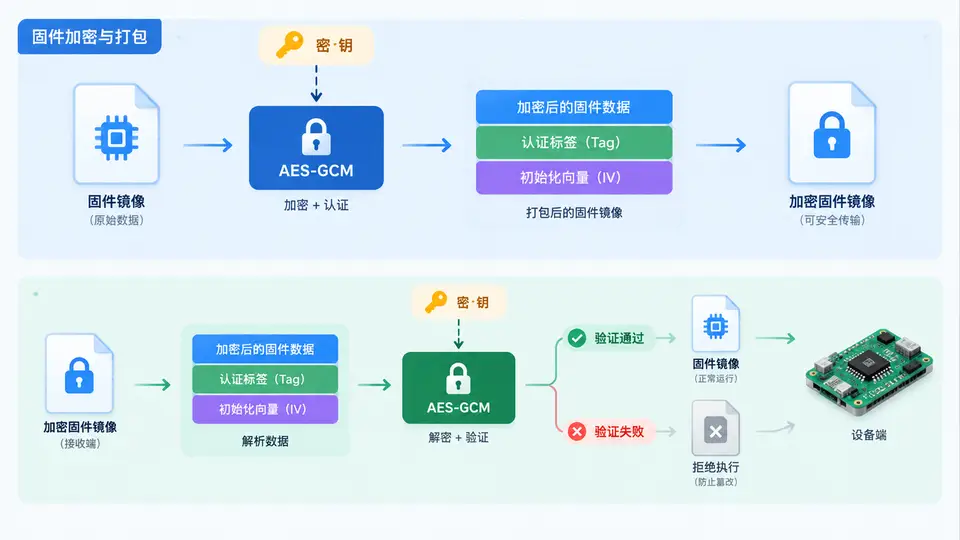
任务目标
本案例实现一个基于 AES-128-CBC 的固件镜像加解密工具,用于保护固件在传输和存储过程中的机密性。加密后的镜像无法被直接读取或烧录,只有持有正确密钥的解密方才能还原原始固件。
环境依赖
- Python 3.7+
- pycryptodome 库(安装命令:
pip install pycryptodome)
核心实现
以下代码完成固件镜像的 AES-128-CBC 加解密全流程,包含密钥派生、PKCS7 填充、加解密操作及文件读写。密钥通过 SHA-256 从口令派生,取前 16 字节作为 AES-128 密钥,IV 为随机生成并存储在加密文件头部。
import os
import hashlib
from Crypto.Cipher import AES
from Crypto.Util.Padding import pad, unpad

# ========== 配置 ==========
KEY_PHRASE = "secure-boot-key-2024"   # 实际使用时应从安全存储读取
BLOCK_SIZE = 16

def derive_key(phrase: bytes) -> bytes:
    """从口令派生 AES-128 密钥(SHA-256 前 16 字节)"""
    return hashlib.sha256(phrase).digest()[:16]

def encrypt_file(input_path: str, output_path: str, key: bytes) -> None:
    """加密固件文件,输出格式: [16字节IV][密文]"""
    iv = os.urandom(BLOCK_SIZE)
    cipher = AES.new(key, AES.MODE_CBC, iv)

    with open(input_path, 'rb') as fin:
        plaintext = fin.read()

    ciphertext = cipher.encrypt(pad(plaintext, BLOCK_SIZE))

    with open(output_path, 'wb') as fout:
        fout.write(iv + ciphertext)

def decrypt_file(input_path: str, output_path: str, key: bytes) -> None:
    """解密固件文件,自动提取头部IV"""
    with open(input_path, 'rb') as fin:
        data = fin.read()

    iv = data[:BLOCK_SIZE]
    ciphertext = data[BLOCK_SIZE:]

    cipher = AES.new(key, AES.MODE_CBC, iv)
    plaintext = unpad(cipher.decrypt(ciphertext), BLOCK_SIZE)

    with open(output_path, 'wb') as fout:
        fout.write(plaintext)

# ========== 最小调用入口 ==========
if __name__ == "__main__":
    import sys

    if len(sys.argv) != 4:
        print("用法: python fw_crypto.py <enc|dec> <输入文件> <输出文件>")
        sys.exit(1)

    mode, in_file, out_file = sys.argv[1], sys.argv[2], sys.argv[3]
    key = derive_key(KEY_PHRASE.encode())

    if mode == "enc":
        encrypt_file(in_file, out_file, key)
        print(f"加密完成: {in_file} -> {out_file}")
    elif mode == "dec":
        decrypt_file(in_file, out_file, key)
        print(f"解密完成: {in_file} -> {out_file}")
    else:
        print("无效模式,使用 enc 或 dec")
        sys.exit(1)
运行与验证
- 准备测试固件:创建一个任意内容的二进制文件作为原始固件,例如
echo "FAKE_FIRMWARE_BINARY_2024" > firmware.bin - 加密:
python fw_crypto.py enc firmware.bin firmware.enc - 解密:
python fw_crypto.py dec firmware.enc firmware_dec.bin - 验证一致性:
cmp firmware.bin firmware_dec.bin,无输出即表示解密后的文件与原始固件完全一致
通过判定标准
- 加密后的
firmware.enc文件大小比原始文件大 16 字节(IV 头部),且内容无法直接识别为明文 cmp命令返回退出码 0,证明解密还原无损- 使用错误密钥解密时,程序抛出
ValueError(PKCS7 填充校验失败),说明加密具备密钥依赖性
安全说明
本案例演示了对称加密在固件保护中的基本用法。实际产品中,密钥应存储在安全硬件(如 TPM、SE)中,而非硬编码在脚本内;同时建议使用 AES-256-GCM 等带认证的加密模式以检测密文篡改。传输场景下可结合 HTTPS 或签名机制实现完整链路保护。