1. TFLite环境搭建与模型转换入门
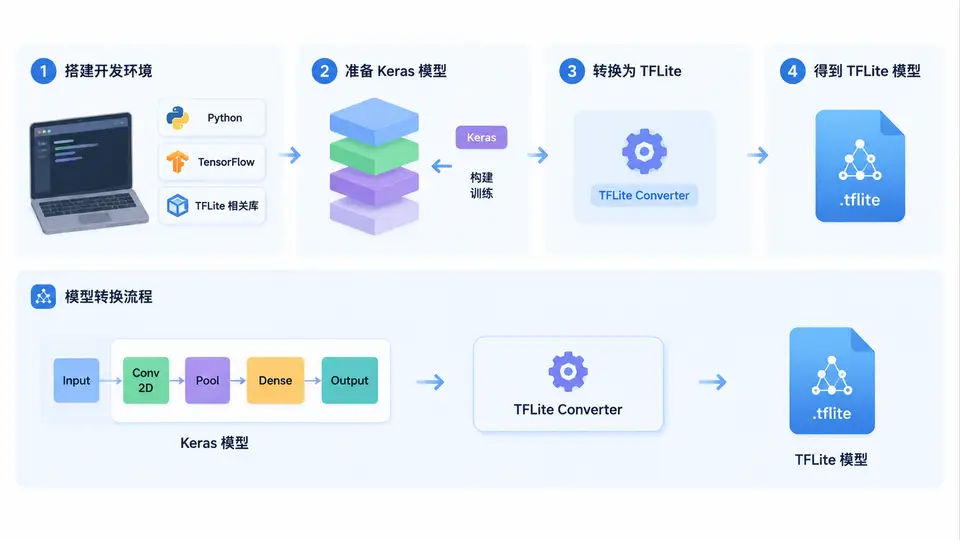
任务目标
在本案例中,你将完成TensorFlow Lite(TFLite)开发环境的搭建,并动手将一个简单的Keras全连接模型转换为TFLite格式。通过本案例,你将掌握TFLite模型转换的标准流程,为后续端侧AI部署打下基础。
环境依赖
需要Python 3.8~3.11环境,并安装以下依赖(建议使用虚拟环境):
pip install tensorflow==2.13.0TFLite转换器已包含在TensorFlow中,无需单独安装。验证安装:
python -c "import tensorflow as tf; print(tf.__version__)"完整实现代码
以下代码完成:创建并训练一个简单的Keras模型 → 转换为TFLite格式 → 验证转换结果。将代码保存为 convert_tflite.py:
import tensorflow as tf
import numpy as np

# 1. 创建并训练一个简单的Keras模型(用于演示转换流程)
model = tf.keras.Sequential([
    tf.keras.layers.Dense(16, activation='relu', input_shape=(4,)),
    tf.keras.layers.Dense(3, activation='softmax')
])

model.compile(optimizer='adam',
              loss='categorical_crossentropy',
              metrics=['accuracy'])

# 生成少量随机训练数据(仅用于演示,不追求精度)
x_train = np.random.rand(100, 4).astype(np.float32)
y_train = tf.keras.utils.to_categorical(np.random.randint(0, 3, 100), 3)

model.fit(x_train, y_train, epochs=2, verbose=0)

# 2. 转换为TFLite格式
converter = tf.lite.TFLiteConverter.from_keras_model(model)
tflite_model = converter.convert()

# 3. 保存TFLite模型
with open('model.tflite', 'wb') as f:
    f.write(tflite_model)

print("转换完成,模型大小: {} bytes".format(len(tflite_model)))

# 4. 验证转换后的模型
interpreter = tf.lite.Interpreter(model_path='model.tflite')
interpreter.allocate_tensors()

# 获取输入输出详情
input_details = interpreter.get_input_details()
output_details = interpreter.get_output_details()

print("输入shape:", input_details[0]['shape'])
print("输出shape:", output_details[0]['shape'])

# 用随机输入测试推理
test_input = np.random.rand(1, 4).astype(np.float32)
interpreter.set_tensor(input_details[0]['index'], test_input)
interpreter.invoke()
output = interpreter.get_tensor(output_details[0]['index'])
print("推理输出shape:", output.shape, "输出值:", output)
运行与验证
执行以下命令运行脚本:
python convert_tflite.py通过条件:满足以下全部条件即判定案例通过:
- 脚本无报错执行完毕,输出
转换完成信息; - 当前目录生成
model.tflite文件; - 验证部分输出的输入shape为
[1 4],输出shape为[1 3]; - 推理输出包含3个概率值(softmax输出),且数值在0~1之间。
常见问题
- 版本兼容问题:若使用TensorFlow 2.16及以上版本,
tf.lite.TFLiteConverter.from_keras_model接口不变,但建议使用2.13.0以保证最佳兼容性。 - 模型输入shape:转换后TFLite模型的输入shape为
[1, 4],其中第一维为batch size,推理时需固定为1。