1. YOLOv5环境搭建与COCO数据集准备
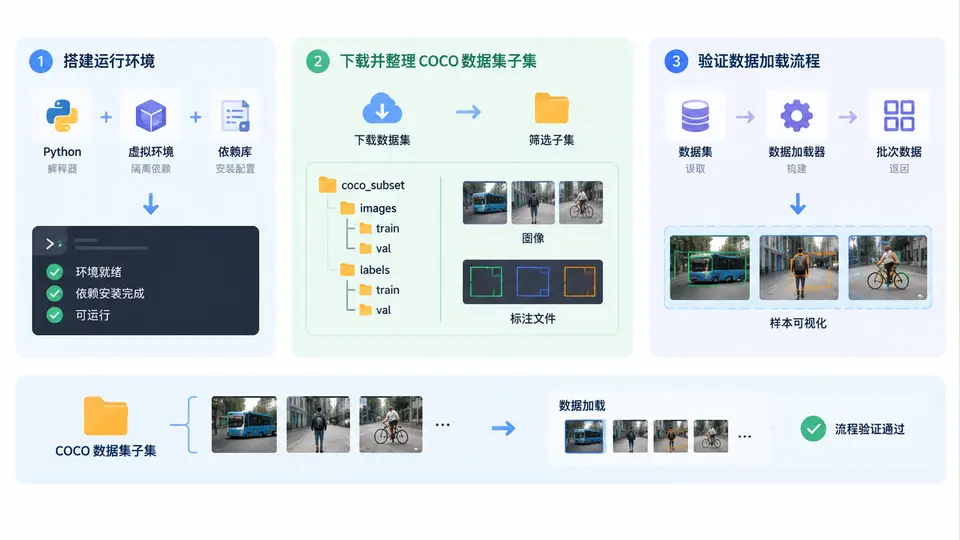
任务目标
本案例完成YOLOv5训练环境的最小可用搭建,并准备一个可直接用于训练的COCO格式微型数据集(含标注与类别文件),最终通过YOLOv5自带的数据加载器验证图片与标签能够正确配对读取。
环境依赖
需提前安装Python 3.8+与PyTorch 1.8+(CPU版亦可)。以下命令安装YOLOv5所需核心依赖:
pip install ultralytics  # 提供yolo CLI与数据加载工具
pip install opencv-python pyyaml tqdm matplotlib seaborn
数据集准备(COCO子集)
从COCO 2017验证集中抽取3张包含“person”类别的图片及其标注,构成微型数据集。目录结构如下:
coco_mini/
├── images/          # 存放3张jpg图片
├── labels/          # 每张图片对应一个txt标签文件
└── data.yaml        # 数据集配置文件
执行以下Python脚本自动完成下载与格式转换(需联网):
import json, os, urllib.request
from pathlib import Path

# 1. 下载COCO验证集标注(仅需一次)
ann_url = "https://images.cocodataset.org/annotations/annotations_trainval2017.zip"
if not Path("instances_val2017.json").exists():
    urllib.request.urlretrieve(ann_url, "ann.zip")
    os.system("unzip -o ann.zip instances_val2017.json && rm ann.zip")

# 2. 筛选含person的前3张图片
with open("instances_val2017.json") as f:
    coco = json.load(f)

cat_id = next(c["id"] for c in coco["categories"] if c["name"] == "person")
img_ids = set()
for ann in coco["annotations"]:
    if ann["category_id"] == cat_id:
        img_ids.add(ann["image_id"])
    if len(img_ids) >= 3:
        break

img_info = {im["id"]: im for im in coco["images"]}
os.makedirs("coco_mini/images", exist_ok=True)
os.makedirs("coco_mini/labels", exist_ok=True)

# 3. 下载图片并生成YOLO格式标签
for i, img_id in enumerate(sorted(img_ids)[:3]):
    im = img_info[img_id]
    img_url = f"http://images.cocodataset.org/val2017/{im['file_name']}"
    urllib.request.urlretrieve(img_url, f"coco_mini/images/{im['file_name']}")

    h, w = im["height"], im["width"]
    lines = []
    for ann in coco["annotations"]:
        if ann["image_id"] == img_id and ann["category_id"] == cat_id:
            x, y, bw, bh = ann["bbox"]
            cx, cy = (x + bw/2) / w, (y + bh/2) / h
            lines.append(f"0 {cx:.6f} {cy:.6f} {bw/w:.6f} {bh/h:.6f}")
    Path(f"coco_mini/labels/{im['file_name'].replace('.jpg','.txt')}").write_text("\n".join(lines))

# 4. 生成data.yaml
yaml_content = f"""path: {os.path.abspath('coco_mini')}
train: images
val: images
nc: 1
names: ['person']
"""
Path("coco_mini/data.yaml").write_text(yaml_content)
print("数据集准备完成")
验证数据加载
使用YOLOv5的数据加载器检查图片与标签是否匹配:
from ultralytics import YOLO

model = YOLO("yolov5nu.pt")  # 自动下载预训练权重
results = model.train(data="coco_mini/data.yaml", epochs=1, imgsz=640, batch=2, device="cpu")

# 训练完成后检查输出日志中的图片数量
print("训练日志中应显示3张图片,且无标签警告")
通过判定标准
- 脚本执行无报错,coco_mini目录下生成3张jpg与3个txt标签文件
- 每个txt文件至少包含一行“0 cx cy w h”格式的归一化坐标
- YOLOv5训练启动后日志显示“3 images”且无“unable to load label”警告
- 训练1轮正常结束,输出模型权重文件
常见问题
- 图片下载失败:检查网络连接,可手动下载图片放入images目录并保持文件名一致
- 标签坐标越界:若bbox超出图片边界,需在脚本中添加坐标裁剪逻辑
- 类别ID错误:COCO中person的category_id为1,若使用其他版本数据集需重新确认