3. 固件文件系统遍历与关键文件定位
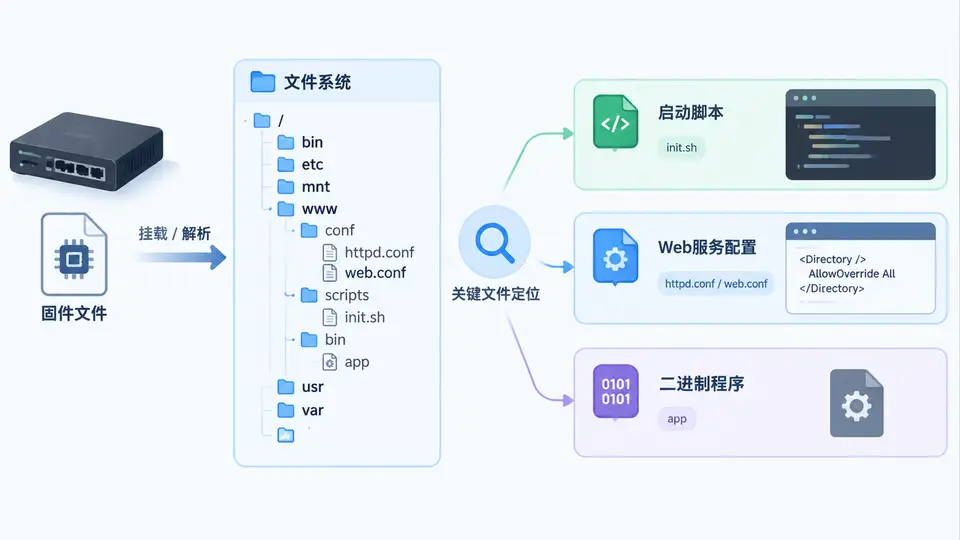
任务目标
给定一个嵌入式Linux固件解包后的根文件系统目录,编写Python脚本递归遍历全部文件,按类别定位三类关键文件:启动脚本(/etc/init.d/、S??*命名)、Web服务配置(包含nginx/httpd/lighttpd等关键字)、以及二进制程序(ELF格式),并输出带完整路径的分类清单。
环境准备
本案例使用 squashfs-root 作为解包后的根目录示例。若尚无固件,可用以下命令构造最小测试目录结构:
mkdir -p squashfs-root/etc/init.d squashfs-root/etc/nginx squashfs-root/usr/bin
echo '#!/bin/sh' > squashfs-root/etc/init.d/S99start
echo 'daemon' > squashfs-root/etc/nginx/nginx.conf
cp /bin/busybox squashfs-root/usr/bin/app_binary
chmod +x squashfs-root/usr/bin/app_binary
关键完整代码
将以下脚本保存为 scan_fs.py:
#!/usr/bin/env python3
import os
import sys
import re
from pathlib import Path

def is_elf(path):
    try:
        with open(path, 'rb') as f:
            return f.read(4) == b'\x7fELF'
    except (IOError, OSError):
        return False

def classify_fs(root):
    root = Path(root)
    startup, webconf, binaries = [], [], []

    # 启动脚本:/etc/init.d/ 下以 S 开头且可执行
    init_dir = root / 'etc' / 'init.d'
    if init_dir.is_dir():
        for p in sorted(init_dir.iterdir()):
            if p.name.startswith('S') and os.access(p, os.X_OK):
                startup.append(str(p))

    # 遍历全部文件,识别 Web 配置与 ELF 二进制
    web_keywords = re.compile(r'(nginx|httpd|lighttpd|apache)', re.I)
    for dirpath, dirnames, filenames in os.walk(root):
        # 跳过已处理的 init.d 避免重复
        if Path(dirpath) == init_dir:
            continue
        for fn in filenames:
            fp = Path(dirpath) / fn
            # Web 配置:文件名或父目录含关键字,且非 ELF
            if web_keywords.search(fn) or web_keywords.search(dirpath):
                if not is_elf(fp):
                    webconf.append(str(fp))
            # ELF 二进制
            elif is_elf(fp):
                binaries.append(str(fp))

    return startup, webconf, binaries

if __name__ == '__main__':
    if len(sys.argv) != 2:
        print(f'Usage: {sys.argv[0]} <rootfs_dir>')
        sys.exit(1)
    s, w, b = classify_fs(sys.argv[1])
    print('=== 启动脚本 ===')
    print('\n'.join(s) if s else '(none)')
    print('=== Web 配置 ===')
    print('\n'.join(w) if w else '(none)')
    print('=== ELF 二进制 ===')
    print('\n'.join(b) if b else '(none)')
运行与验证
- 运行扫描:
python3 scan_fs.py squashfs-root - 预期输出(基于上述测试目录):
=== 启动脚本 ===
squashfs-root/etc/init.d/S99start
=== Web 配置 ===
squashfs-root/etc/nginx/nginx.conf
=== ELF 二进制 ===
squashfs-root/usr/bin/app_binary通过判定标准:脚本能递归遍历整个文件系统;启动脚本仅匹配 init.d 下以 S 开头且带可执行权限的文件;Web 配置能捕获文件名或所在路径含 nginx/httpd 等关键字的非 ELF 文件;ELF 检测基于文件头魔数 \x7fELF,不依赖扩展名。三类输出路径均以传入根目录为前缀,且与真实目录结构一致。
常见问题
- 误报/漏报:若固件使用
busybox的httpd,配置可能位于/etc/httpd.conf,文件名含httpd可被捕获;若配置为www.conf且路径无关键字,需自行扩展关键字列表。 - 权限不足:部分文件不可读时
is_elf返回False,该文件会被跳过而非报错,适合只读固件镜像。 - 符号链接:当前实现不跟随目录符号链接,避免死循环;如需跟随可改用
os.walk(..., followlinks=True)。