3. 过滤低分辨率图像
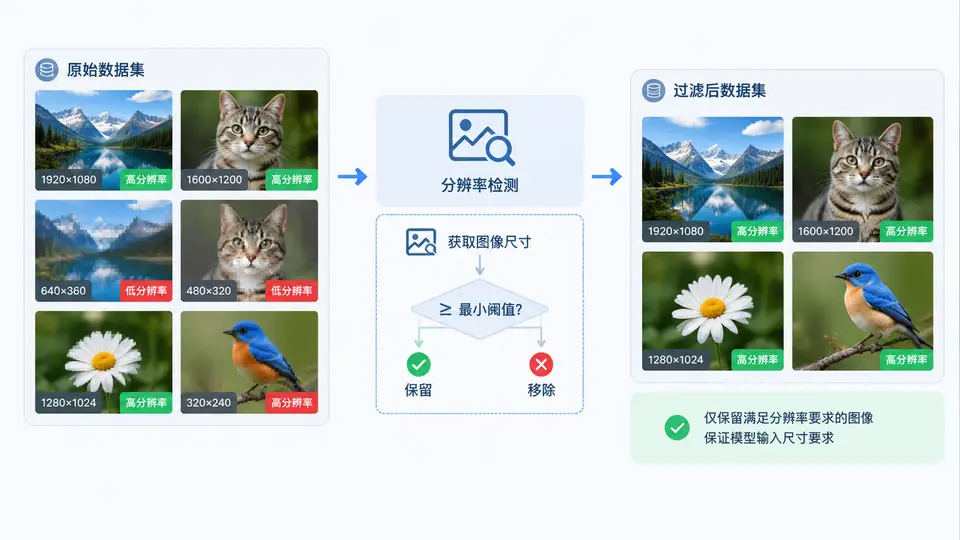
任务目标
构建一个图像过滤脚本,设定最小宽高阈值(如 256×256),自动扫描指定目录下的所有图片,检测并移除分辨率低于阈值的文件,确保后续模型训练输入满足尺寸要求。
环境依赖
需要 Pillow 库处理图像尺寸读取。安装命令:
pip install Pillow核心实现
import os
from PIL import Image

def filter_low_res_images(input_dir, min_width=256, min_height=256, remove=False):
    """
    检测并移除低于最小分辨率的图像。
    参数:
        input_dir: 图像目录路径
        min_width/min_height: 最小宽高阈值
        remove: True=直接删除文件; False=仅打印不合格文件路径
    返回:
        (total_count, removed_count) 元组
    """
    valid_exts = {'.jpg', '.jpeg', '.png', '.bmp', '.webp', '.tiff'}
    total = 0
    removed = 0

    for filename in os.listdir(input_dir):
        ext = os.path.splitext(filename)[1].lower()
        if ext not in valid_exts:
            continue

        filepath = os.path.join(input_dir, filename)
        try:
            with Image.open(filepath) as img:
                width, height = img.size
        except Exception as e:
            print(f"[跳过] {filename}: 无法读取 ({e})")
            continue

        total += 1
        if width < min_width or height < min_height:
            print(f"[不合格] {filename}: {width}x{height} (阈值 {min_width}x{min_height})")
            if remove:
                os.remove(filepath)
                removed += 1
        else:
            print(f"[合格] {filename}: {width}x{height}")

    return total, removed

if __name__ == "__main__":
    # 使用示例:扫描 ./images 目录,删除低于 256x256 的图片
    total, removed = filter_low_res_images("./images", 256, 256, remove=True)
    print(f"\n扫描完成: 共 {total} 张图片, 移除 {removed} 张低分辨率图片")
运行方式
- 将待过滤图片放入
./images目录(与脚本同级的 images 文件夹)。 - 执行脚本:
python filter_images.py - 如需先预览不合格文件而不删除,将
remove=True改为remove=False再运行。
验证方法
运行脚本后观察输出:
- 每张图片会打印
[合格]或[不合格]及其实际尺寸。 - 当
remove=True时,不合格文件会被删除,终端显示移除数量。 - 手动抽查:用文件管理器确认剩余图片均大于等于 256×256,或使用以下命令复核:
python -c "from PIL import Image; import os; [print(f, Image.open(os.path.join('./images', f)).size) for f in os.listdir('./images') if f.lower().endswith(('.png','.jpg','.jpeg'))]"
若所有输出尺寸均满足 width >= 256 and height >= 256,则过滤成功。
常见问题
- 误删风险:脚本直接调用
os.remove不可恢复,建议先以remove=False运行确认名单,再执行删除。 - 损坏文件:无法用 Pillow 打开的图片会被跳过并提示,不会误删。
- 子目录:当前实现仅扫描顶层目录,如需递归子目录,可改用
os.walk遍历。