1. 创建第一个ROS2工作空间与功能包
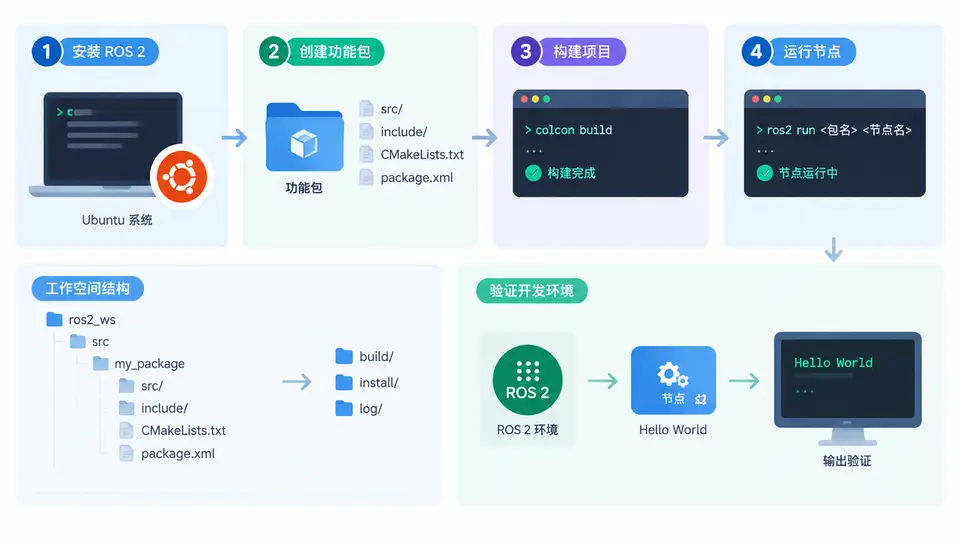
任务目标
在Ubuntu 22.04上安装ROS2 Humble,创建并构建一个C++功能包,运行hello world节点,验证开发环境可用。
环境准备
本案例基于Ubuntu 22.04 + ROS2 Humble。安装前确保系统已配置好UTF-8 locale,并已安装curl、gnupg等基础工具。
安装ROS2 Humble
# 1. 设置locale
sudo apt update && sudo apt install -y locales
sudo locale-gen en_US en_US.UTF-8
sudo update-locale LC_ALL=en_US.UTF-8 LANG=en_US.UTF-8

# 2. 添加ROS2软件源
sudo apt install -y curl gnupg lsb-release
sudo curl -sSL https://raw.githubusercontent.com/ros/rosdistro/master/ros.key -o /usr/share/keyrings/ros-archive-keyring.gpg
echo "deb [arch=$(dpkg --print-architecture) signed-by=/usr/share/keyrings/ros-archive-keyring.gpg] http://packages.ros.org/ros2/ubuntu $(lsb_release -cs) main" | sudo tee /etc/apt/sources.list.d/ros2.list > /dev/null

# 3. 安装ROS2 Humble桌面版(含rqt等可视化工具)
sudo apt update
sudo apt install -y ros-humble-desktop

# 4. 安装编译工具
sudo apt install -y python3-argcomplete python3-colcon-common-extensions

# 5. 配置环境变量
echo "source /opt/ros/humble/setup.bash" >> ~/.bashrc
source ~/.bashrc
创建并构建功能包
创建名为hello_world_pkg的C++功能包,包含一个发布hello world消息的节点。
# 创建工作空间
mkdir -p ~/ros2_ws/src
cd ~/ros2_ws/src

# 创建C++功能包
ros2 pkg create --build-type ament_cmake --node-name hello_node hello_world_pkg

# 编辑源文件
cat > hello_world_pkg/src/hello_node.cpp << 'EOF'
#include "rclcpp/rclcpp.hpp"
#include "std_msgs/msg/string.hpp"

class HelloNode : public rclcpp::Node
{
public:
    HelloNode() : Node("hello_node")
    {
        publisher_ = this->create_publisher<std_msgs::msg::String>("hello_topic", 10);
        timer_ = this->create_wall_timer(
            std::chrono::seconds(1),
            std::bind(&HelloNode::timer_callback, this));
    }

private:
    void timer_callback()
    {
        auto message = std_msgs::msg::String();
        message.data = "Hello ROS2 from C++ node!";
        RCLCPP_INFO(this->get_logger(), "Publishing: '%s'", message.data.c_str());
        publisher_->publish(message);
    }
    rclcpp::Publisher<std_msgs::msg::String>::SharedPtr publisher_;
    rclcpp::TimerBase::SharedPtr timer_;
};

int main(int argc, char *argv[])
{
    rclcpp::init(argc, argv);
    rclcpp::spin(std::make_shared<HelloNode>());
    rclcpp::shutdown();
    return 0;
}
EOF

# 编辑CMakeLists.txt,添加依赖
cat > hello_world_pkg/CMakeLists.txt << 'EOF'
cmake_minimum_required(VERSION 3.8)
project(hello_world_pkg)

if(CMAKE_COMPILER_IS_GNUCXX OR CMAKE_CXX_COMPILER_ID MATCHES "Clang")
  add_compile_options(-Wall -Wextra -Wpedantic)
endif()

find_package(ament_cmake REQUIRED)
find_package(rclcpp REQUIRED)
find_package(std_msgs REQUIRED)

add_executable(hello_node src/hello_node.cpp)
ament_target_dependencies(hello_node rclcpp std_msgs)

install(TARGETS
  hello_node
  DESTINATION lib/${PROJECT_NAME})

ament_package()
EOF

# 构建
cd ~/ros2_ws
colcon build --packages-select hello_world_pkg
运行与验证
# 终端1:source环境并运行节点
source ~/ros2_ws/install/setup.bash
ros2 run hello_world_pkg hello_node预期输出:节点每秒打印一次Publishing: 'Hello ROS2 from C++ node!'。
# 终端2:验证话题通信
source /opt/ros/humble/setup.bash
ros2 topic echo /hello_topic预期输出:持续显示data: Hello ROS2 from C++ node!。
通过条件
- 终端1每秒输出一条日志,无编译或运行错误;
- 终端2能收到并显示话题消息,证明节点发布功能正常;
ros2 node list能列出/hello_node节点。
常见问题
- 找不到
ros2命令:执行source /opt/ros/humble/setup.bash,或重新打开终端。 - colcon构建失败:确认已安装
python3-colcon-common-extensions,且当前目录为~/ros2_ws。 - 功能包找不到:运行前需执行
source ~/ros2_ws/install/setup.bash。