1. 搭建生产级LLM推理服务基础架构
任务目标
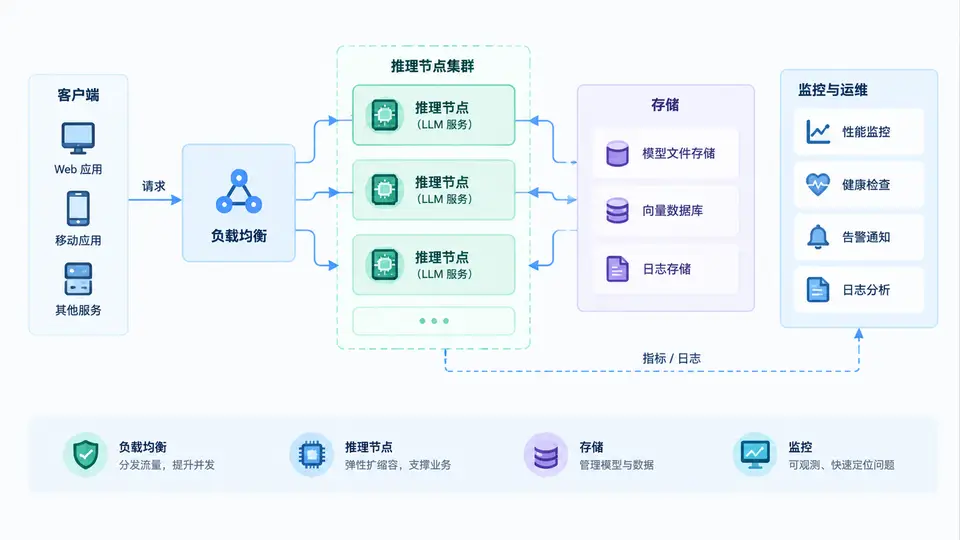
本案例要求搭建一个生产级LLM推理服务的基础架构,核心组件包括:负载均衡器(Nginx)、推理节点(vLLM服务)、共享存储(Redis,用于KV Cache调度或结果缓存)以及监控组件(Prometheus + Grafana)。最终通过负载均衡器将请求分发至多个推理节点,并验证单节点故障时服务仍可用。
架构总览
环境依赖
- Ubuntu 22.04+ / CentOS 7+,已安装 Docker 24+ 与 Docker Compose v2
- NVIDIA GPU + CUDA 12.1(推理节点需要,负载均衡与监控节点可不用)
- 模型权重:
Qwen/Qwen2.5-7B-Instruct(HuggingFace 格式,需提前下载或运行时拉取)
完整实现
使用 Docker Compose 编排全部组件。以下为 docker-compose.yml 完整内容:
version: "3.8"

services:
  # ---------- 推理节点 1 ----------
  vllm1:
    image: vllm/vllm-:latest
    container_name: vllm-node1
    command: >
      --model Qwen/Qwen2.5-7B-Instruct
      --served-model-name qwen
      --port 8001
      --gpu-memory-utilization 0.85
      --max-model-len 8192
    ports:
      - "8001:8001"
    volumes:
      - ~/.cache/huggingface:/root/.cache/huggingface
    deploy:
      resources:
        reservations:
          devices:
            - driver: nvidia
              device_ids: ["0"]
              capabilities: [gpu]
    healthcheck:
      test: ["CMD", "curl", "-f", "http://localhost:8001/health"]
      interval: 10s
      timeout: 5s
      retries: 5
      start_period: 120s

  # ---------- 推理节点 2 ----------
  vllm2:
    image: vllm/vllm-:latest
    container_name: vllm-node2
    command: >
      --model Qwen/Qwen2.5-7B-Instruct
      --served-model-name qwen
      --port 8002
      --gpu-memory-utilization 0.85
      --max-model-len 8192
    ports:
      - "8002:8002"
    volumes:
      - ~/.cache/huggingface:/root/.cache/huggingface
    deploy:
      resources:
        reservations:
          devices:
            - driver: nvidia
              device_ids: ["1"]
              capabilities: [gpu]
    healthcheck:
      test: ["CMD", "curl", "-f", "http://localhost:8002/health"]
      interval: 10s
      timeout: 5s
      retries: 5
      start_period: 120s

  # ---------- 负载均衡 ----------
  nginx:
    image: nginx:1.27-alpine
    container_name: llm-lb
    ports:
      - "8080:80"
    volumes:
      - ./nginx.conf:/etc/nginx/nginx.conf:ro
    depends_on:
      - vllm1
      - vllm2
    healthcheck:
      test: ["CMD", "wget", "-q", "--spider", "http://localhost/health"]
      interval: 10s
      timeout: 3s
      retries: 3

  # ---------- 存储 ----------
  redis:
    image: redis:7-alpine
    container_name: llm-redis
    ports:
      - "6379:6379"
    command: redis-server --appendonly yes
    volumes:
      - redis-data:/data

  # ---------- 监控 ----------
  prometheus:
    image: prom/prometheus:v2.53.0
    container_name: llm-prometheus
    ports:
      - "9090:9090"
    volumes:
      - ./prometheus.yml:/etc/prometheus/prometheus.yml:ro
    command:
      - --config.file=/etc/prometheus/prometheus.yml
    depends_on:
      - nginx

  grafana:
    image: grafana/grafana:11.1.0
    container_name: llm-grafana
    ports:
      - "3000:3000"
    environment:
      - GF_SECURITY_ADMIN_PASSWORD=admin
    volumes:
      - grafana-data:/var/lib/grafana
    depends_on:
      - prometheus

volumes:
  redis-data:
  grafana-data:
Nginx 配置 nginx.conf(实现轮询负载均衡与健康检查):
events {}

http {
    upstream vllm_backend {
        least_conn;  # 最少连接策略
        server vllm1:8001 max_fails=3 fail_timeout=30s;
        server vllm2:8002 max_fails=3 fail_timeout=30s;
    }

    server {
        listen 80;

        location / {
            proxy_pass http://vllm_backend;
            proxy_set_header Host $host;
            proxy_set_header X-Real-IP $remote_addr;
            proxy_read_timeout 600s;  # LLM 推理可能较慢
            proxy_send_timeout 600s;
        }

        location /health {
            return 200 "OK\n";
        }
    }
}
Prometheus 配置 prometheus.yml(采集 Nginx 与节点指标):
global:
  scrape_interval: 15s

scrape_configs:
  - job_name: "nginx"
    static_configs:
      - targets: ["nginx:80"]

  - job_name: "vllm"
    metrics_path: /metrics
    static_configs:
      - targets: ["vllm1:8001", "vllm2:8002"]
运行与部署
# 1. 启动全部服务
docker compose up -d

# 2. 查看服务状态(等待 vllm 健康检查通过,约需 2-5 分钟加载模型)
docker compose ps

# 3. 验证负载均衡健康检查
curl http://localhost:8080/health
# 预期输出: OK

# 4. 发送推理请求(经负载均衡)
curl http://localhost:8080/v1/chat/completions \
  -H "Content-Type: application/json" \
  -d '{
    "model": "qwen",
    "messages": [{"role": "user", "content": "你好,请用一句话介绍你自己"}],
    "max_tokens": 100
  }'
高可用验证方法
- 正常转发验证:连续发送 10 次推理请求,观察 Nginx 日志(
docker logs llm-lb),确认请求被分发到两个节点(vllm1 与 vllm2 各有约 5 次)。 - 故障转移验证:手动停止一个推理节点(
docker stop vllm1),再次发送请求,确认仍能正常获得响应(由 vllm2 处理),Nginx 自动将流量切换到健康节点。 - 恢复验证:重启 vllm1(
docker start vllm1),等待其健康检查通过后,Nginx 自动将其重新纳入负载均衡池。 - 监控验证:浏览器访问
http://localhost:3000(Grafana,账号 admin/admin),添加 Prometheus 数据源(URL:http://prometheus:9090),可查看节点请求量、GPU 利用率等指标。
通过条件:上述 4 项验证全部通过,即负载均衡正常分发、单节点故障期间服务不中断、节点恢复后自动重新加入、监控面板能展示节点指标。
常见问题
- vLLM 启动失败:确认 GPU 驱动与 CUDA 版本匹配,且
device_ids指向实际存在的 GPU 编号(用nvidia-smi查看)。 - 模型下载慢:提前执行
huggingface-cli download Qwen/Qwen2.5-7B-Instruct完成预下载,再启动容器。 - Nginx 502 错误:vLLM 尚未就绪,等待健康检查通过后自动恢复;或检查
docker compose ps中 vllm 节点状态。