1. Hello World 线程
任务目标
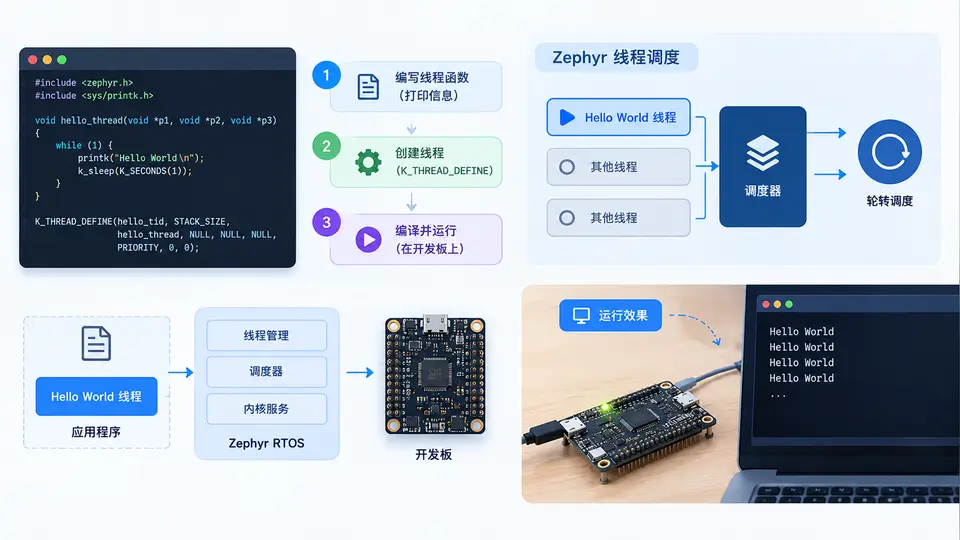
在 Zephyr RTOS 中创建一个用户线程,该线程启动后打印 Hello World,以此验证线程创建、调度与内核编译链接流程是否正常。
环境依赖
本案例基于 Zephyr v3.5+,硬件平台使用 QEMU Cortex-M3(无需真实开发板)。需预先安装 Zephyr SDK 与 west 工具链,并完成 west init 与 west update。
工程结构
在 Zephyr 工作目录下创建独立应用:
hello_thread/
├── CMakeLists.txt
├── prj.conf
└── src/
    └── main.c
关键完整代码
CMakeLists.txt(最小工程定义):
cmake_minimum_required(VERSION 3.20.0)
find_package(Zephyr REQUIRED HINTS $ENV{ZEPHYR_BASE})
project(hello_thread)
target_sources(app PRIVATE src/main.c)
prj.conf(启用用户线程所需配置):
CONFIG_THREAD_NAME=y
src/main.c(核心实现):
#include <zephyr/kernel.h>
#include <zephyr/sys/printk.h>

/* 线程栈大小与优先级 */
#define STACK_SIZE 1024
#define THREAD_PRIORITY 7

/* 线程入口函数 */
void hello_thread_entry(void *arg1, void *arg2, void *arg3)
{
    ARG_UNUSED(arg1);
    ARG_UNUSED(arg2);
    ARG_UNUSED(arg3);

    printk("Hello World\n");
}

/* 线程栈与线程控制块 */
K_THREAD_STACK_DEFINE(hello_stack, STACK_SIZE);
static struct k_thread hello_thread_data;

int main(void)
{
    printk("Main thread: creating hello thread...\n");

    /* 创建并启动线程 */
    k_thread_create(&hello_thread_data, hello_stack, STACK_SIZE,
                    hello_thread_entry, NULL, NULL, NULL,
                    THREAD_PRIORITY, 0, K_NO_WAIT);

    /* 等待线程执行完成(线程打印后即退出) */
    k_sleep(K_MSEC(100));

    printk("Main thread: done.\n");
    return 0;
}
构建与运行
- 进入应用目录:
cd hello_thread - 构建(指定 QEMU 目标):
west build -b qemu_cortex_m3 - 运行:
west build -t run
验证方法与通过条件
运行后终端输出应依次出现:
Main thread: creating hello thread...
Hello World
Main thread: done.
其中 Hello World 由新建线程打印,证明:
- 线程栈定义与
k_thread_create参数正确; - 内核成功调度该线程并执行其入口函数;
- 线程打印后正常退出,主线程继续运行至结束。
若输出顺序一致且无错误信息,则案例验证通过。
常见问题
- 编译报错找不到 Zephyr:确认已 source
zephyr-env.sh或设置ZEPHYR_BASE环境变量。 - 线程未打印:检查栈大小是否足够(1024 字节通常足够),或优先级是否被更高优先级任务持续抢占(本案例无其他任务,不存在此问题)。
- QEMU 无法启动:确认主机已安装
qemu-system-arm,且 Zephyr SDK 版本与 QEMU 兼容。