3. 按键输入与中断
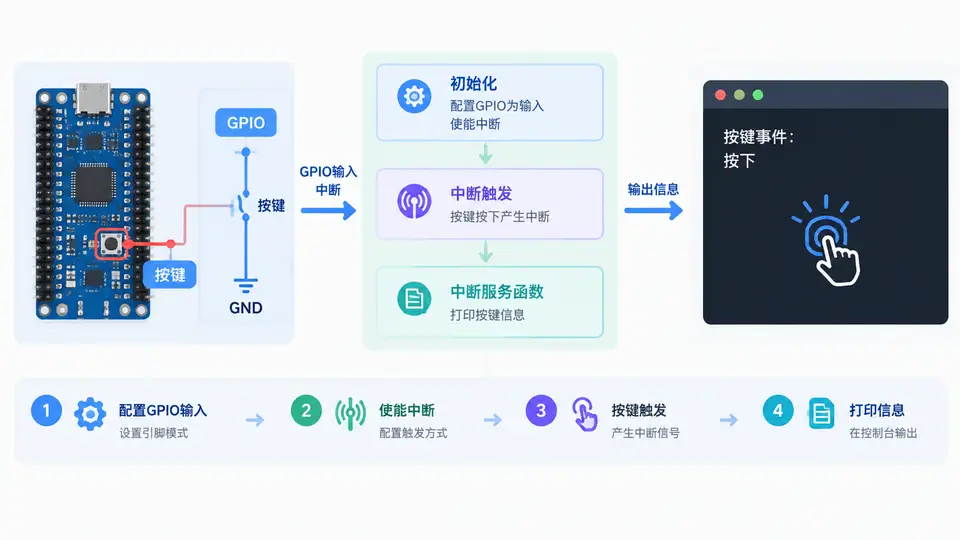
任务目标
在Zephyr RTOS中配置一个GPIO引脚作为按键输入,并使能中断。当按键按下时,触发中断回调函数,在回调中打印按键事件信息。本案例使用开发板自带用户按键(若开发板无按键,可自行用杜邦线将GPIO引脚接地模拟)。
环境依赖
- Zephyr RTOS 3.x及以上版本
- 开发板:以NRF52840DK为例(其他板卡需调整设备树与引脚号)
- 已安装Zephyr SDK并完成west环境初始化
关键完整代码
创建项目目录button_interrupt,包含以下文件:
prj.conf
CONFIG_GPIO=y
CONFIG_PRINTK=y
src/main.c
#include <zephyr/kernel.h>
#include <zephyr/device.h>
#include <zephyr/drivers/gpio.h>
#include <zephyr/sys/printk.h>

/* 开发板按键节点:NRF52840DK 用户按键为 button0 */
#define SW0_NODE DT_ALIAS(sw0)
static const struct gpio_dt_spec button = GPIO_DT_SPEC_GET(SW0_NODE, gpios);

/* 中断回调函数 */
static struct gpio_callback button_cb_data;

void button_pressed(const struct device *dev, struct gpio_callback *cb, uint32_t pins)
{
    printk("Button pressed! (pin %u)\n", pins);
}

int main(void)
{
    int ret;

    if (!gpio_is_ready_dt(&button)) {
        printk("Error: button device %s is not ready\n", button.port->name);
        return -1;
    }

    ret = gpio_pin_configure_dt(&button, GPIO_INPUT);
    if (ret < 0) {
        printk("Error %d: failed to configure %s pin %d\n",
               ret, button.port->name, button.pin);
        return -1;
    }

    /* 配置中断:下降沿触发(按键按下时电平由高到低) */
    ret = gpio_pin_interrupt_configure_dt(&button, GPIO_INT_EDGE_TO_ACTIVE);
    if (ret < 0) {
        printk("Error %d: failed to configure interrupt on %s pin %d\n",
               ret, button.port->name, button.pin);
        return -1;
    }

    gpio_init_callback(&button_cb_data, button_pressed, BIT(button.pin));
    gpio_add_callback(button.port, &button_cb_data);

    printk("Button interrupt example started. Press the button.\n");

    while (1) {
        k_sleep(K_MSEC(1000));
    }
    return 0;
}
boards/nrf52840dk_nrf52840.overlay(若板卡设备树已含sw0别名则无需此文件)
/ {
    aliases {
        sw0 = &button0;
    };
};
构建与运行
west build -b nrf52840dk_nrf52840 .
west flash
验证方法
- 使用串口终端(如minicom或PuTTY)连接开发板,波特率115200。
- 复位开发板,终端应输出
Button interrupt example started. - 按下开发板上的用户按键(SW0),终端应立即输出
Button pressed! (pin 13)(引脚号取决于具体板卡)。 - 松开按键并再次按下,每次按下均输出一条信息,说明中断触发正常。
判定通过标准
- 程序编译无错误,烧录成功。
- 每次按下按键,串口终端均打印对应事件信息,且无重复触发或漏触发。
- 若使用逻辑分析仪或示波器观察GPIO电平,按键按下时引脚电平变化与中断配置一致。
常见问题
- 编译报错找不到sw0别名:确认板卡设备树中已定义
sw0别名,或添加overlay文件。 - 中断不触发:检查按键是否接上拉电阻(多数开发板内置),确认触发边沿配置与按键电路匹配(按下为低电平则用
GPIO_INT_EDGE_TO_ACTIVE)。 - 按键抖动导致多次触发:可在回调中增加软件延时消抖,或使用
GPIO_INT_EDGE_BOTH配合状态判断。