1. 搭建玄铁C906最小系统开发环境
任务目标
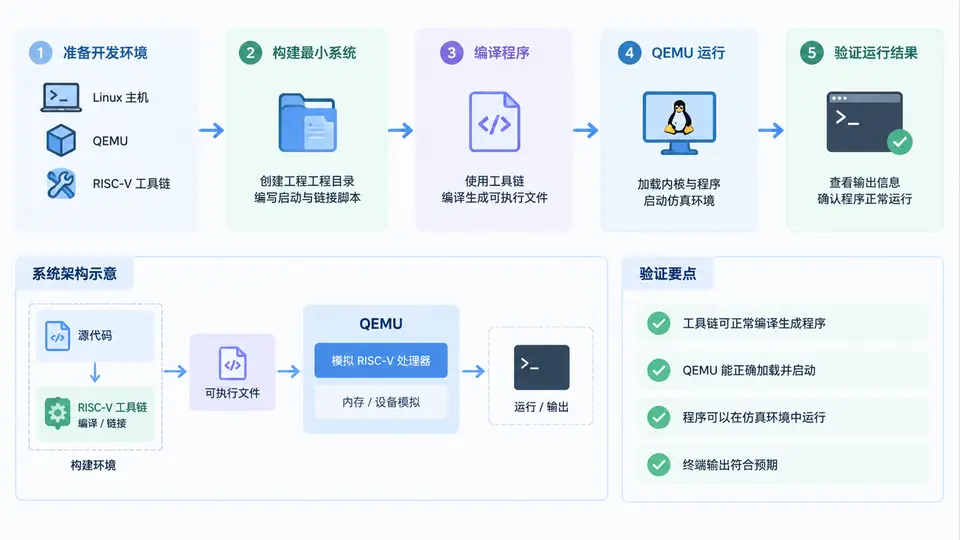
在本案例中,你将基于QEMU搭建玄铁C906的最小系统开发环境,完成工具链安装、内核与根文件系统编译,并最终在仿真环境中运行Hello World程序,以验证工具链和QEMU仿真环境可用。
环境依赖
- 主机系统:Ubuntu 20.04/22.04 x86_64(或其他Linux发行版)
- 必要软件包:
git、make、gcc、g++、flex、bison、libncurses-dev、libssl-dev、python3、python3-dev、python3-setuptools - 磁盘空间:至少10GB可用空间
工具链与源码获取
使用平头哥官方提供的预编译RISC-V工具链,避免从源码编译工具链的耗时过程。执行以下命令下载并配置环境:
# 下载工具链(约300MB)
wget https://occ-oss-prod.oss-cn-hangzhou.aliyuncs.com/resource//1720134986753/Xuantie-900-gcc-linux-5.10.4-toolchain.2.3.3.tar.gz
tar -xzf Xuantie-900-gcc-linux-5.10.4-toolchain.2.3.3.tar.gz -C ~/
export PATH=$PATH:~/Xuantie-900-gcc-linux-5.10.4-toolchain.2.3.3/bin

# 验证工具链
riscv64-unknown-linux-gnu-gcc --version
克隆玄铁Linux内核与Buildroot源码:
git clone https://github.com/T-head-Semi/linux.git -b riscv_5.10.4_900
git clone https://github.com/T-head-Semi/buildroot.git -b riscv_5.10.4_900
最小系统构建
使用Buildroot直接生成内核镜像与根文件系统,这是构建C906最小系统的最简路径。进入Buildroot目录执行配置与编译:
cd buildroot
make qemu_c906_defconfig
make -j$(nproc)编译完成后,生成的关键文件位于output/images/目录:
Image— 内核镜像fw_payload_uart.elf— 包含OpenSBI和U-Boot的固件rootfs.ext4— 根文件系统
编写Hello World程序
在宿主机上创建C文件并交叉编译:
cat > hello.c << 'EOF'
#include <stdio.h>
int main() {
    printf("Hello World from C906!\n");
    return 0;
}
EOF

riscv64-unknown-linux-gnu-gcc -static -o hello hello.c
将编译好的可执行文件放入根文件系统镜像:
mkdir -p mnt
sudo mount -o loop output/images/rootfs.ext4 mnt
sudo cp hello mnt/root/
sudo umount mnt
QEMU仿真运行
安装QEMU(版本需支持RISC-V virt机器):
sudo apt install qemu-system-misc启动仿真系统:
qemu-system-riscv64 -M virt -smp 2 -m 2G \
  -bios output/images/fw_payload_uart.elf \
  -drive file=output/images/rootfs.ext4,format=raw,id=hd0 \
  -device virtio-blk-device,drive=hd0 \
  -netdev user,id=net0 -device virtio-net-device,netdev=net0 \
  -nographic
系统启动后进入Linux shell,执行以下命令验证:
mount /dev/vda /mnt
/mnt/hello
验证方法与通过标准
当终端输出以下内容时,判定环境搭建成功:
Hello World from C906!同时,在QEMU中执行uname -a应显示内核版本为5.10.4且架构为riscv64,证明C906最小系统运行正常。
常见问题
- 工具链无法执行:确认已安装
libncurses5或libncursesw5兼容库,执行sudo apt install libncurses5。 - Buildroot编译失败:检查网络连接,部分源码包需从外部下载;若因主机CPU架构问题,可尝试
make -j1单线程编译。 - QEMU启动无输出:确认使用
-nographic参数且固件路径正确;若使用其他QEMU版本,可尝试-bios default。