3. 设备文件操作集
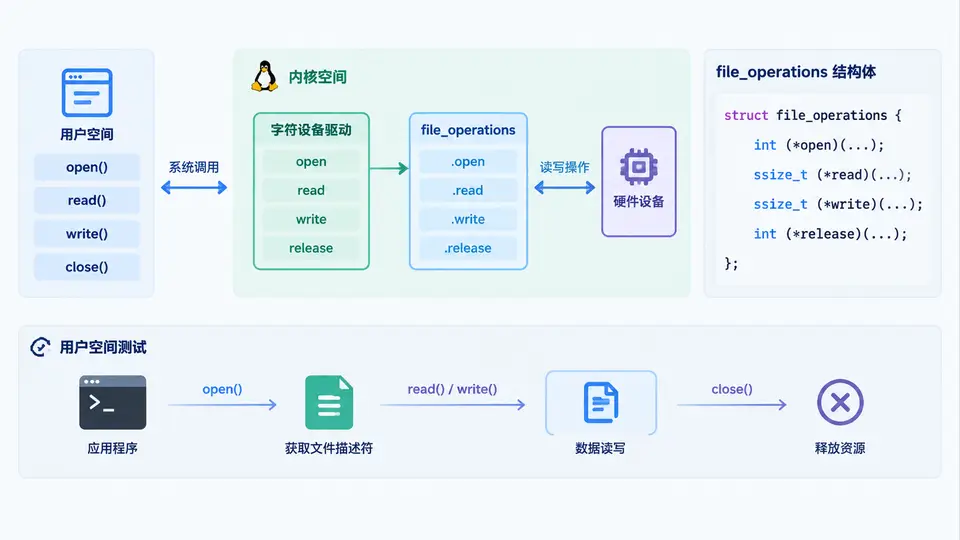
任务目标
为字符设备驱动实现完整的 file_operations 结构体,包含 open、read、write、release 四个核心回调,并在用户空间通过设备节点验证读写功能。
驱动实现
创建设备号并注册字符设备,使用内核内存缓冲区保存数据。读操作将内核缓冲数据拷贝到用户空间,写操作从用户空间接收数据存入内核缓冲。设备节点通过 miscdevice 方式注册,简化主设备号分配流程。
#include <linux/module.h>
#include <linux/fs.h>
#include <linux/miscdevice.h>
#include <linux/uaccess.h>
#include <linux/slab.h>

#define DEV_BUFSIZE 1024

static char *dev_buffer;
static int dev_open_count;

static int demo_open(struct inode *inode, struct file *filp)
{
    dev_open_count++;
    pr_info("device opened, open count: %d\n", dev_open_count);
    return 0;
}

static ssize_t demo_read(struct file *filp, char __user *buf,
                         size_t count, loff_t *ppos)
{
    ssize_t ret;

    if (*ppos >= DEV_BUFSIZE)
        return 0;

    if (count > DEV_BUFSIZE - *ppos)
        count = DEV_BUFSIZE - *ppos;

    ret = copy_to_user(buf, dev_buffer + *ppos, count);
    if (ret)
        return -EFAULT;

    *ppos += count;
    pr_info("read %zu bytes from offset %lld\n", count, *ppos - count);
    return count;
}

static ssize_t demo_write(struct file *filp, const char __user *buf,
                          size_t count, loff_t *ppos)
{
    ssize_t ret;

    if (*ppos >= DEV_BUFSIZE)
        return -ENOSPC;

    if (count > DEV_BUFSIZE - *ppos)
        count = DEV_BUFSIZE - *ppos;

    ret = copy_from_user(dev_buffer + *ppos, buf, count);
    if (ret)
        return -EFAULT;

    *ppos += count;
    pr_info("written %zu bytes at offset %lld\n", count, *ppos - count);
    return count;
}

static int demo_release(struct inode *inode, struct file *filp)
{
    dev_open_count--;
    pr_info("device released, open count: %d\n", dev_open_count);
    return 0;
}

static const struct file_operations demo_fops = {
    .owner   = THIS_MODULE,
    .open    = demo_open,
    .read    = demo_read,
    .write   = demo_write,
    .release = demo_release,
};

static struct miscdevice demo_miscdev = {
    .minor = MISC_DYNAMIC_MINOR,
    .name  = "demo_char_dev",
    .fops  = &demo_fops,
};

static int __init demo_init(void)
{
    int ret;

    dev_buffer = kzalloc(DEV_BUFSIZE, GFP_KERNEL);
    if (!dev_buffer)
        return -ENOMEM;

    ret = misc_register(&demo_miscdev);
    if (ret) {
        kfree(dev_buffer);
        pr_err("failed to register misc device\n");
        return ret;
    }

    pr_info("demo char device registered\n");
    return 0;
}

static void __exit demo_exit(void)
{
    misc_deregister(&demo_miscdev);
    kfree(dev_buffer);
    pr_info("demo char device unregistered\n");
}

module_init(demo_init);
module_exit(demo_exit);

MODULE_LICENSE("GPL");
MODULE_AUTHOR("Kernel Driver Lab");
MODULE_DESCRIPTION("Character device with open/read/write/release ops");
编译与加载
# Makefile
obj-m += demo_char.o
KDIR := /lib/modules/$(shell uname -r)/build
all:
	make -C $(KDIR) M=$(PWD) modules
clean:
	make -C $(KDIR) M=$(PWD) clean
make
sudo insmod demo_char.ko
# 确认设备节点已创建
ls -l /dev/demo_char_dev
用户空间测试
# 写数据到设备
echo "hello kernel" | sudo tee /dev/demo_char_dev

# 读取数据(需先关闭写端,重新打开读取)
sudo cat /dev/demo_char_dev
验证方法
- 加载模块后执行
dmesg | tail,应看到demo char device registered日志。 - 执行写命令后,
dmesg中应出现written 13 bytes at offset 0类似日志。 - 执行读命令后,终端应输出之前写入的字符串
hello kernel,且dmesg中出现read 13 bytes from offset 0。 - 每次 open/close 时
dmesg会打印对应的 open count 增减日志。
预期输出:cat 命令打印 hello kernel,与写入内容一致。若读写偏移、数据长度与日志记录相符,则驱动功能验证通过。
注意事项
- 设备节点由
misc_register自动创建于/dev目录,无需手动mknod。 - 缓冲区大小固定为 1024 字节,写入超过该长度时后续写入返回
-ENOSPC。 - 测试完成后执行
sudo rmmod demo_char卸载模块,并确认/dev/demo_char_dev消失。