1. 创建第一个Qt线程
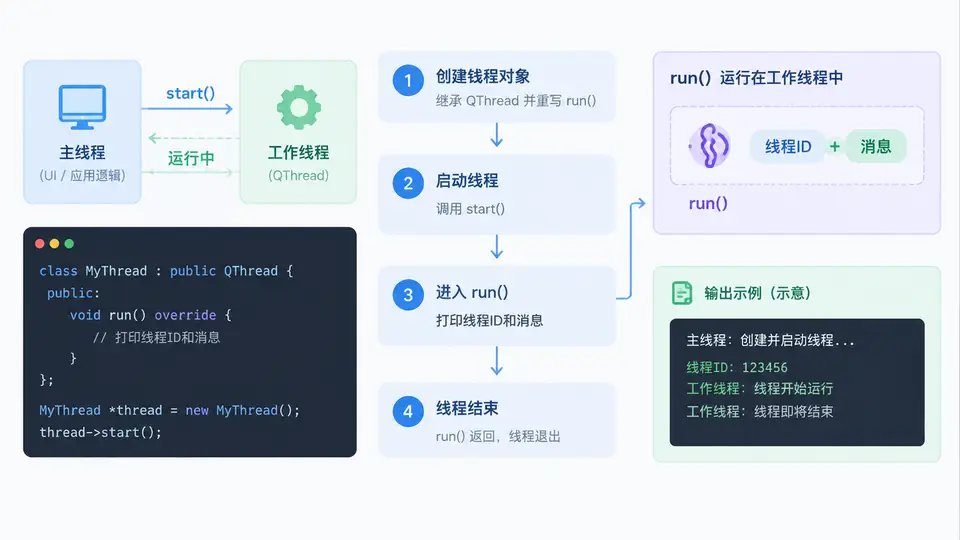
任务目标
使用 QThread 创建并启动一个简单线程,在 run() 中打印线程 ID 和消息,掌握线程的基本生命周期(创建 → 启动 → 运行 → 结束)。
环境与依赖
- Qt 5.12+(或 Qt 6.x)
- 编译器:支持 C++11 或更高版本
- 构建工具:qmake 或 CMake(本案例使用 qmake)
完整实现
创建一个继承自 QThread 的自定义线程类,重写 run() 函数。在 run() 中通过 QThread::currentThreadId() 获取当前线程 ID,并打印消息。主线程中实例化并启动该线程,同时打印主线程 ID 以作对比。
// mythread.h
#ifndef MYTHREAD_H
#define MYTHREAD_H

#include <QThread>
#include <QDebug>

class MyThread : public QThread
{
    Q_OBJECT
public:
    explicit MyThread(QObject *parent = nullptr);

protected:
    void run() override;
};

#endif // MYTHREAD_H

// mythread.cpp
#include "mythread.h"

MyThread::MyThread(QObject *parent)
    : QThread(parent)
{
}

void MyThread::run()
{
    // 打印子线程 ID 和消息
    qDebug() << "子线程运行中,线程 ID:" << QThread::currentThreadId();
    qDebug() << "Hello from child thread!";
}

// main.cpp
#include <QCoreApplication>
#include <QDebug>
#include "mythread.h"

int main(int argc, char *argv[])
{
    QCoreApplication a(argc, argv);

    qDebug() << "主线程 ID:" << QThread::currentThreadId();

    MyThread thread;
    thread.start();          // 启动线程,自动调用 run()

    // 等待线程结束(演示生命周期,实际应用中应避免阻塞主线程)
    thread.wait();

    qDebug() << "线程已结束,回到主线程";

    return a.exec();
}

// mythread.pro
QT += core
QT -= gui

TARGET = firstthread
CONFIG += console
CONFIG -= app_bundle

TEMPLATE = app

SOURCES += main.cpp \
           mythread.cpp

HEADERS += mythread.h
运行方式
- 将上述四个文件(
mythread.h、mythread.cpp、main.cpp、mythread.pro)放在同一目录下。 - 在终端中执行以下命令:
qmake
make
./firstthread
验证方法
程序运行后,观察终端输出。预期输出如下(线程 ID 为十六进制,每次运行可能不同):
主线程 ID: 0x7f8a4a0b3780
子线程运行中,线程 ID: 0x7f8a49e00640
Hello from child thread!
线程已结束,回到主线程
判定通过条件:
- 主线程 ID 与子线程 ID 不同,证明
run()确实在独立线程中执行。 - 输出顺序符合预期:先打印主线程 ID,再打印子线程消息,最后打印结束提示。
- 程序正常退出,无崩溃或死锁。
关键说明
start()会创建新线程并调用run(),run()返回后线程即结束。wait()阻塞主线程直到子线程结束,本案例仅用于演示生命周期;实际应用中应避免在主线程中直接调用wait(),以免界面卡顿。- 线程对象(
MyThread)在子线程结束后仍然存在,可再次调用start()重新启动,但通常建议一个线程对象只启动一次。