3. 基于TLS的加密通信
任务目标
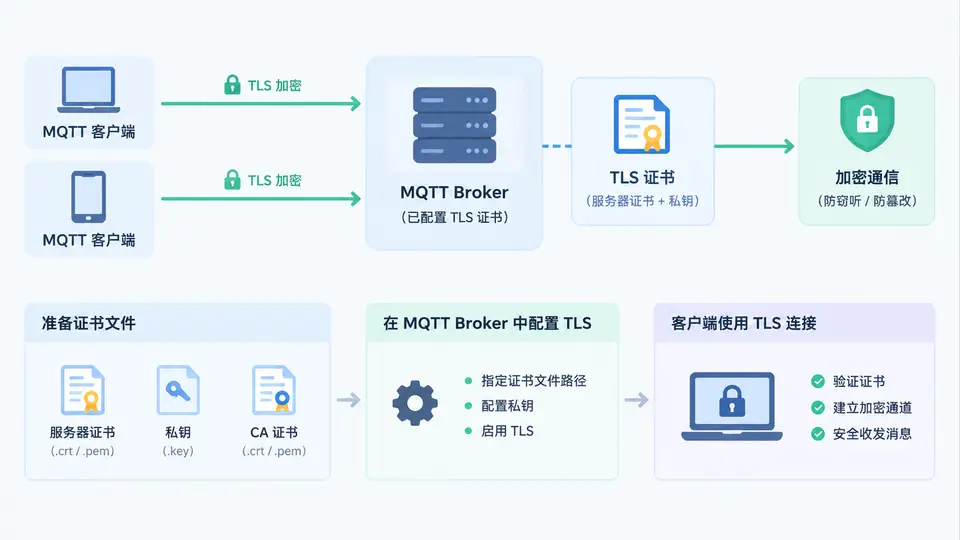
为 Mosquitto MQTT Broker 配置 TLS 证书,使客户端与 Broker 之间的通信进行加密传输,并验证加密连接是否成功建立。
环境准备
本案例需要以下环境:
- 已安装 Mosquitto Broker(本案例以 mosquitto 2.0.x 为例)
- 已安装 mosquitto_pub / mosquitto_sub 客户端工具
- 已安装 openssl 命令行工具
生成 TLS 证书
使用 openssl 生成 CA 证书、服务端证书和私钥。以下命令在 Linux/macOS 终端中执行,Windows 用户可使用 WSL 或 Git Bash。
# 1. 生成 CA 私钥和自签名 CA 证书
openssl req -new -x509 -days 365 -keyout ca.key -out ca.crt -subj "/CN=MQTT-CA"

# 2. 生成服务端私钥
openssl genrsa -out server.key 2048

# 3. 生成服务端证书签名请求(CSR)
openssl req -new -key server.key -out server.csr -subj "/CN=localhost"

# 4. 使用 CA 签发服务端证书(添加 SAN 扩展以支持 localhost)
echo "subjectAltName=DNS:localhost,IP:127.0.0.1" > ext.cnf
openssl x509 -req -in server.csr -CA ca.crt -CAkey ca.key -CAcreateserial \
    -out server.crt -days 365 -extfile ext.cnf
配置 Mosquitto Broker
创建 Mosquitto 配置文件 mosquitto-tls.conf:
# 监听 8883 端口(TLS 默认端口)
listener 8883

# 证书文件路径
cafile /path/to/ca.crt
certfile /path/to/server.crt
keyfile /path/to/server.key

# 禁止非 TLS 连接(可选,仅允许加密通信)
allow_anonymous false
将上述路径替换为实际证书文件所在目录,然后启动 Broker:
mosquitto -c mosquitto-tls.conf验证加密通信
使用 mosquitto_pub 和 mosquitto_sub 验证 TLS 连接。打开两个终端:
终端 1 — 订阅消息(使用 CA 证书验证服务端):
mosquitto_sub -h localhost -p 8883 --cafile /path/to/ca.crt -t "test/topic" -v终端 2 — 发布消息:
mosquitto_pub -h localhost -p 8883 --cafile /path/to/ca.crt -t "test/topic" -m "Hello TLS"通过条件:终端 1 收到消息 test/topic Hello TLS,且连接过程中无证书验证错误。若在发布或订阅命令中省略 --cafile 参数,连接应失败并提示证书验证错误,这证明 TLS 加密已生效。
常见问题
- 证书路径错误:Mosquitto 启动时报错找不到文件,请检查配置中的路径是否为路径。
- 连接被拒绝:确认 Broker 正在监听 8883 端口(可使用
netstat -tlnp | grep 8883查看)。 - 证书验证失败:客户端必须使用与 Broker 配置相同的
ca.crt进行验证,且服务端证书的 CN 或 SAN 必须与连接的主机名(localhost)匹配。