3. 色温估计与AWB
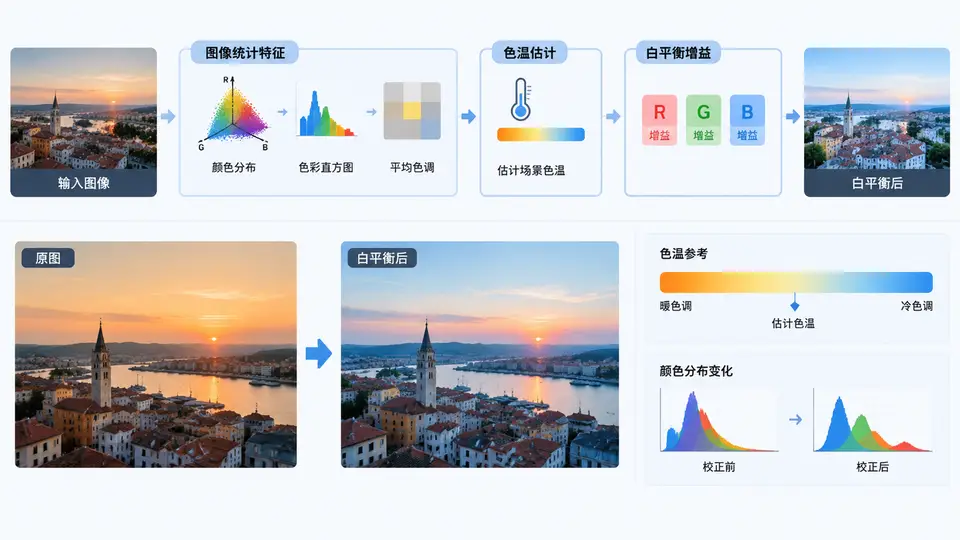
任务目标
本案例实现一个最小可复现的自动白平衡(AWB)流程:输入一张RAW格式图像(或模拟RAW数据),通过灰度世界假设估计场景色温,计算R/G/B通道增益并应用,最终输出校正后的图像。核心在于理解色温与通道增益的对应关系,并验证校正后图像中灰色区域趋于中性。
实现原理
采用灰度世界假设:场景中所有像素的平均颜色应为中性灰(R=G=B)。据此,通道增益为:
gain_R = G_avg / R_avg
gain_B = G_avg / B_avg
gain_G = 1.0
色温估计通过R/G与B/G比值映射到近似的开尔文色温值(仅作参考,不参与增益计算)。
关键完整代码
import numpy as np
from scipy.interpolate import interp1d

def simulate_raw_image(width=128, height=128, color_temp=4500):
    """生成模拟RAW图像(单通道Bayer RGGB),含已知色温的光源偏移"""
    # 理想灰卡反射率(各通道50%反射)
    base = np.full((height, width), 0.5, dtype=np.float32)
    # 光源色温对应的通道增益(归一化到G通道)
    # 低色温偏红(R高),高色温偏蓝(B高)
    if color_temp <= 5000:
        r_gain = 1.0 + (5000 - color_temp) * 0.0002   # 最高1.2
        b_gain = 1.0 - (5000 - color_temp) * 0.0001   # 最低0.9
    else:
        r_gain = 1.0 - (color_temp - 5000) * 0.0001   # 最低0.9
        b_gain = 1.0 + (color_temp - 5000) * 0.0002   # 最高1.2
    # 生成Bayer马赛克(RGGB)
    raw = np.zeros((height, width), dtype=np.float32)
    raw[0::2, 0::2] = base[0::2, 0::2] * r_gain   # R
    raw[0::2, 1::2] = base[0::2, 1::2]             # G1
    raw[1::2, 0::2] = base[1::2, 0::2]             # G2
    raw[1::2, 1::2] = base[1::2, 1::2] * b_gain   # B
    # 加少量噪声
    raw += np.random.normal(0, 0.01, raw.shape).astype(np.float32)
    return np.clip(raw, 0, 1)

def demosaic_simple(raw):
    """最简双线性插值去马赛克,返回RGB三通道"""
    h, w = raw.shape
    rgb = np.zeros((h, w, 3), dtype=np.float32)
    # R通道
    rgb[0::2, 0::2, 0] = raw[0::2, 0::2]
    rgb[0::2, 1::2, 0] = (raw[0::2, 0:-1:2][:, ::2] + raw[0::2, 2::2][:, ::2]) / 2 if w > 2 else raw[0::2, 0::2]
    # 简化:直接使用最近邻填充(教学演示足够)
    rgb[:, :, 0] = np.kron(raw[0::2, 0::2], np.ones((2, 2)))
    rgb[:, :, 1] = np.kron(raw[0::2, 1::2], np.ones((2, 2)))
    rgb[:, :, 2] = np.kron(raw[1::2, 1::2], np.ones((2, 2)))
    return rgb

def estimate_awb_gains(rgb_img):
    """灰度世界假设估计增益"""
    avg_r = np.mean(rgb_img[:, :, 0])
    avg_g = np.mean(rgb_img[:, :, 1])
    avg_b = np.mean(rgb_img[:, :, 2])
    gain_r = avg_g / avg_r if avg_r > 0 else 1.0
    gain_b = avg_g / avg_b if avg_b > 0 else 1.0
    return gain_r, 1.0, gain_b

def estimate_color_temp(r_gain, b_gain):
    """根据增益比粗略映射色温(仅参考)"""
    ratio = (r_gain / b_gain) if b_gain > 0 else 1.0
    # 经验映射:ratio=1.33→3000K, ratio=1.0→5000K, ratio=0.75→7000K
    temps = np.array([3000, 5000, 7000])
    ratios = np.array([1.33, 1.0, 0.75])
    if ratio <= ratios[0] and ratio >= ratios[-1]:
        f = interp1d(ratios, temps, fill_value='extrapolate')
        return float(f(ratio))
    return 5000.0

def apply_awb(rgb_img, gains):
    """应用增益并归一化"""
    corrected = rgb_img * np.array(gains, dtype=np.float32)
    # 归一化到[0,1]防止饱和
    max_val = np.max(corrected)
    if max_val > 1.0:
        corrected /= max_val
    return np.clip(corrected, 0, 1)

# ========== 主流程 ==========
if __name__ == "__main__":
    # 1. 模拟已知色温的RAW输入
    true_temp = 4500  # 模拟真实光源色温
    raw = simulate_raw_image(color_temp=true_temp)

    # 2. 去马赛克得到RGB
    rgb = demosaic_simple(raw)

    # 3. 估计增益
    gr, gg, gb = estimate_awb_gains(rgb)
    print(f"估计增益: R={gr:.3f}, G={gg:.3f}, B={gb:.3f}")

    # 4. 估计色温
    est_temp = estimate_color_temp(gr, gb)
    print(f"估计色温: {est_temp:.0f}K (真实值: {true_temp}K)")

    # 5. 应用白平衡
    corrected = apply_awb(rgb, (gr, gg, gb))

    # 6. 验证:校正后灰色区域应接近中性
    avg_r_c = np.mean(corrected[:, :, 0])
    avg_g_c = np.mean(corrected[:, :, 1])
    avg_b_c = np.mean(corrected[:, :, 2])
    print(f"校正后通道均值: R={avg_r_c:.3f}, G={avg_g_c:.3f}, B={avg_b_c:.3f}")
    print(f"中性偏差: max|R-G|={abs(avg_r_c-avg_g_c):.4f}, max|B-G|={abs(avg_b_c-avg_g_c):.4f}")
运行与验证
环境依赖:Python 3.8+,NumPy,SciPy(仅用于插值函数)。
运行方式:
python awb_demo.py通过条件:
- 程序正常输出估计增益与色温,无报错;
- 估计色温与真实色温偏差在±500K以内(噪声影响下);
- 校正后通道均值满足:
max(|R-G|, |B-G|) < 0.02,表明灰色区域已恢复中性。
验证逻辑说明:由于输入是模拟的均匀灰卡图像,灰度世界假设完全成立,因此校正后各通道均值应几乎相等。若使用真实图像,需确保场景中存在足够多的色彩多样性,否则灰度世界假设会失效。
常见问题
- 色温估计偏差较大:灰度世界假设本身不估计色温,本案例的色温映射是经验公式,仅用于教学演示。实际工程中需用更复杂的统计模型(如边缘保持的灰色边缘假设)。
- 校正后偏色残留:若场景中大面积单色物体(如蓝天、绿草),灰度世界假设会失效。可改用动态阈值法或完美反射假设。
- RAW格式适配:本案例使用模拟RAW数据,实际应用中需先做黑电平扣除、镜头阴影校正等预处理,再进入AWB模块。