1. OTA升级包生成与签名
任务说明
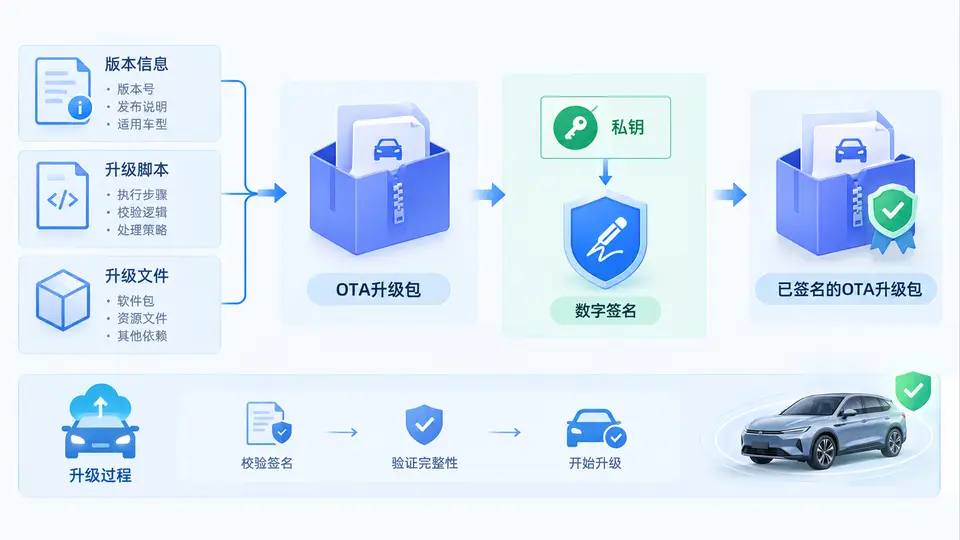
本案例实现一个最小可用的OTA升级包生成与签名工具:将版本信息与升级脚本打包为ZIP归档,使用RSA私钥对归档内容计算SHA-256摘要并签名,最终生成 .zip 升级包与 .sig 签名文件。验证方可通过公钥验签确认升级包未被篡改且来源可信。
环境依赖
需要Python 3.8+,仅使用标准库 zipfile、hashlib、cryptography。安装依赖:
pip install cryptography完整实现
import zipfile
import hashlib
import json
from pathlib import Path
from cryptography.hazmat.primitives import hashes, serialization
from cryptography.hazmat.primitives.asymmetric import rsa, padding

# ---------- 1. 生成RSA密钥对(仅演示用,实际应由安全机构保管) ----------
def generate_keypair(key_path: Path):
    private_key = rsa.generate_private_key(public_exponent=65537, key_size=2048)
    public_key = private_key.public_key()
    key_path.parent.mkdir(parents=True, exist_ok=True)
    with open(key_path, "wb") as f:
        f.write(private_key.private_bytes(
            encoding=serialization.Encoding.PEM,
            format=serialization.PrivateFormat.PKCS8,
            encryption_algorithm=serialization.NoEncryption()
        ))
    with open(str(key_path) + ".pub", "wb") as f:
        f.write(public_key.public_bytes(
            encoding=serialization.Encoding.PEM,
            format=serialization.PublicFormat.SubjectPublicKeyInfo
        ))
    return private_key, public_key

# ---------- 2. 构建OTA升级包 ----------
def build_ota_package(version: str, script_content: str, output_zip: Path):
    manifest = {
        "version": version,
        "files": ["update.sh"],
        "created_by": "ota-builder"
    }
    with zipfile.ZipFile(output_zip, "w", zipfile.ZIP_DEFLATED) as zf:
        zf.writestr("manifest.json", json.dumps(manifest, indent=2))
        zf.writestr("update.sh", script_content)
    return output_zip

# ---------- 3. 计算摘要并签名 ----------
def sign_package(zip_path: Path, private_key, sig_path: Path):
    digest = hashlib.sha256(zip_path.read_bytes()).digest()
    signature = private_key.sign(
        digest,
        padding.PKCS1v15(),
        hashes.SHA256()
    )
    sig_path.write_bytes(signature)
    return digest.hex()

# ---------- 4. 验证签名 ----------
def verify_signature(zip_path: Path, sig_path: Path, public_key) -> bool:
    digest = hashlib.sha256(zip_path.read_bytes()).digest()
    try:
        public_key.verify(
            sig_path.read_bytes(),
            digest,
            padding.PKCS1v15(),
            hashes.SHA256()
        )
        return True
    except Exception:
        return False

# ---------- 主流程 ----------
if __name__ == "__main__":
    # 配置路径
    base = Path("./ota_demo")
    key_file = base / "keys/ota_private.pem"
    zip_file = base / "ota_package_v1.0.0.zip"
    sig_file = base / "ota_package_v1.0.0.zip.sig"

    # 1. 生成密钥(首次运行)
    if not key_file.exists():
        generate_keypair(key_file)
    with open(key_file, "rb") as f:
        private_key = serialization.load_pem_private_key(f.read(), password=None)
    public_key = private_key.public_key()

    # 2. 构造升级包内容
    version = "1.0.0"
    update_script = """#!/bin/bash
# 示例升级脚本:实际项目中在此执行文件替换、服务重启等操作
echo "OTA update to version 1.0.0 started..."
# 模拟升级动作
touch /tmp/ota_update_marker
echo "Update completed."
"""
    build_ota_package(version, update_script, zip_file)

    # 3. 签名
    digest_hex = sign_package(zip_file, private_key, sig_file)
    print(f"升级包: {zip_file}")
    print(f"签名文件: {sig_file}")
    print(f"SHA-256摘要: {digest_hex[:16]}...")

    # 4. 验证(自检)
    ok = verify_signature(zip_file, sig_file, public_key)
    print(f"签名验证: {'通过' if ok else '失败'}")
运行与验证
- 将上述代码保存为
ota_builder.py,在终端执行:
python ota_builder.py- 程序将自动完成密钥生成、打包、签名和验证,输出类似以下内容:
升级包: ./ota_demo/ota_package_v1.0.0.zip
签名文件: ./ota_demo/ota_package_v1.0.0.zip.sig
SHA-256摘要: 3f7a9c2e...
签名验证: 通过- 验证篡改检测:手动修改
ota_package_v1.0.0.zip中任意字节(例如用文本编辑器在文件末尾追加一个空格),重新运行验证代码(可单独执行verify_signature函数),签名验证应返回False。
关键说明
- 签名对象是ZIP文件的完整二进制内容,任何字节改动都会导致SHA-256摘要变化,从而使验签失败。
- 实际OTA系统中,私钥应保存在离线安全环境中,公钥预置于车机端用于验签。
- 本案例使用2048位RSA密钥,满足基本安全要求;生产环境可根据安全策略升级到4096位或使用ECC。