1. 移动支付项目初始化与依赖配置
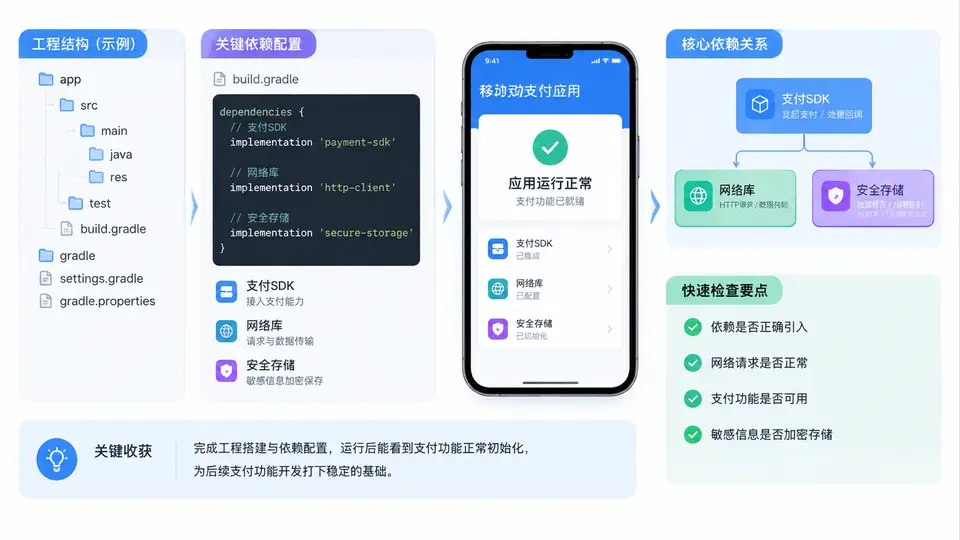
工程骨架与依赖分层
移动支付工程的第一步不是写业务代码,而是把工程骨架和依赖边界定清楚。本例创建一个 Android 工程(Kotlin + Gradle Kotlin DSL),按职责把依赖分成四层:支付 SDK、网络库、安全存储、基础支撑。分层的目的在于后续接入微信支付、支付宝、银联等渠道时,业务层只依赖抽象接口,不直接依赖某个 SDK 的具体类。
Gradle 依赖配置
使用版本目录(Version Catalog)统一管理版本号,避免多模块版本漂移。在 gradle/libs.versions.toml 中声明:
[versions]
agp = "8.5.2"
kotlin = "2.0.20"
okhttp = "4.12.0"
retrofit = "2.11.0"
serialization = "1.7.1"
securityCrypto = "1.1.0-alpha06"
wechatSdk = "6.8.0"
alipaySdk = "15.8.17"

[libraries]
okhttp-core = { module = "com.squareup.okhttp3:okhttp", version.ref = "okhttp" }
okhttp-logging = { module = "com.squareup.okhttp3:logging-interceptor", version.ref = "okhttp" }
retrofit-core = { module = "com.squareup.retrofit2:retrofit", version.ref = "retrofit" }
retrofit-kotlinx = { module = "com.squareup.retrofit2:converter-kotlinx-serialization", version.ref = "retrofit" }
kotlinx-serialization-json = { module = "org.jetbrains.kotlinx:kotlinx-serialization-json", version.ref = "serialization" }
androidx-security-crypto = { module = "androidx.security:security-crypto", version.ref = "securityCrypto" }
wechat-sdk = { module = "com.tencent.mm.opensdk:wechat-sdk-android", version.ref = "wechatSdk" }
alipay-sdk = { module = "com.alipay.sdk:alipaysdk-android", version.ref = "alipaySdk" }

[plugins]
android-application = { id = "com.android.application", version.ref = "agp" }
kotlin-android = { id = "org.jetbrains.kotlin.android", version.ref = "kotlin" }
kotlin-serialization = { id = "org.jetbrains.kotlin.plugin.serialization", version.ref = "kotlin" }
在 app/build.gradle.kts 中按层引入依赖,支付 SDK 用 implementation 而非 api,防止渠道类泄漏到业务层:
plugins {
    alias(libs.plugins.android.application)
    alias(libs.plugins.kotlin.android)
    alias(libs.plugins.kotlin.serialization)
}

android {
    namespace = "com.example.mobilepay"
    compileSdk = 35
    defaultConfig {
        applicationId = "com.example.mobilepay"
        minSdk = 24
        targetSdk = 35
        versionCode = 1
        versionName = "1.0.0"
    }
    buildFeatures { viewBinding = true }
    compileOptions {
        sourceCompatibility = JavaVersion.VERSION_17
        targetCompatibility = JavaVersion.VERSION_17
    }
    kotlinOptions { jvmTarget = "17" }
}

dependencies {
    // 网络层
    implementation(libs.okhttp.core)
    implementation(libs.okhttp.logging)
    implementation(libs.retrofit.core)
    implementation(libs.retrofit.kotlinx)
    implementation(libs.kotlinx.serialization.json)

    // 安全存储层
    implementation(libs.androidx.security.crypto)

    // 支付 SDK 层(渠道实现模块可见,业务层不可见)
    implementation(libs.wechat.sdk)
    implementation(libs.alipay.sdk)
}
minSdk 设为 24 是因为 EncryptedSharedPreferences 要求 API 23+,而微信 SDK 6.8.0 建议 24+。若需支持更低版本,安全存储层需降级为 Keystore 手动封装。
安全存储初始化
支付场景必须加密存储商户号、token、密钥别名。使用 EncryptedSharedPreferences 封装一个最小可用的 SecureStore:
class SecureStore(context: Context) {
    private val masterKey = MasterKey.Builder(context)
        .setKeyScheme(MasterKey.KeyScheme.AES256_GCM)
        .build()

    private val prefs = EncryptedSharedPreferences.create(
        context,
        "pay_secure_prefs",
        masterKey,
        EncryptedSharedPreferences.PrefKeyEncryptionScheme.AES256_SIV,
        EncryptedSharedPreferences.PrefValueEncryptionScheme.AES256_GCM
    )

    fun putToken(token: String) = prefs.edit().putString("access_token", token).apply()
    fun getToken(): String? = prefs.getString("access_token", null)
    fun putMerchantId(id: String) = prefs.edit().putString("merchant_id", id).apply()
    fun getMerchantId(): String? = prefs.getString("merchant_id", null)
}
最小可运行验证
在 MainActivity 中做一次依赖自检,确认各层可加载、安全存储可读写:
class MainActivity : AppCompatActivity() {
    override fun onCreate(savedInstanceState: Bundle?) {
        super.onCreate(savedInstanceState)
        setContentView(R.layout.activity_main)

        val store = SecureStore(this)
        store.putMerchantId("MCH_TEST_0001")
        store.putToken("tok_demo_123")

        val report = buildString {
            appendLine("OkHttp: ${okhttp3.OkHttpClient::class.java.`package`?.implementationVersion}")
            appendLine("Retrofit: ${retrofit2.Retrofit::class.java.`package`?.implementationVersion}")
            appendLine("merchantId: ${store.getMerchantId()}")
            appendLine("token: ${store.getToken()?.take(6)}...")
        }
        findViewById<TextView>(R.id.tvReport).text = report
    }
}
验证步骤与通过条件:
- 执行
./gradlew :app:assembleDebug,构建成功且无依赖冲突(可用./gradlew :app:dependencies检查)。 - 安装启动 App,界面显示 OkHttp、Retrofit 版本号,说明网络层已正确加载。
- 显示
merchantId: MCH_TEST_0001与token: tok_de...,说明安全存储读写正常。 - 若出现
ClassNotFoundException,检查对应依赖是否被implementation正确引入;若安全存储抛GeneralSecurityException,检查设备是否支持 Keystore。
支付 SDK 的
implementation 隔离是后续渠道抽象的前提。若此处用 api 暴露,业务层会直接引用微信/支付宝类,例2 的抽象接口将无法真正解耦。