3. settings.gradle 多模块仓库声明
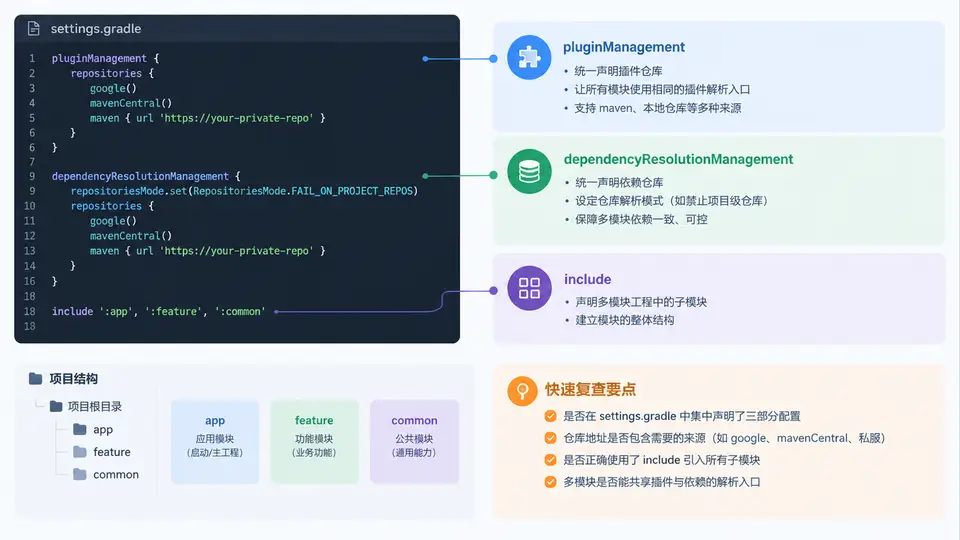
为什么多模块工程必须先解决“入口”问题
单模块工程里,仓库地址和插件版本可以随手写在根 build.gradle 里。一旦拆成多模块,每个子模块都会独立解析插件和依赖,如果入口不统一,就会出现:子模块找不到插件、仓库重复声明、CI 与本地解析结果不一致。Gradle 7 之后,settings.gradle 成为集中管理这些入口的推荐位置,它比根构建脚本更早执行,能决定“去哪里找插件、去哪里找依赖、有哪些模块参与构建”。
settings.gradle 的三块核心声明
一个面向多模块 Android 工程的 settings.gradle 通常由三部分组成,它们分别解决三个不同层面的问题:
- pluginManagement:声明插件从哪些仓库解析,以及插件版本如何统一。它只影响
plugins {}块中的插件解析。 - dependencyResolutionManagement:声明普通依赖(implementation、api 等)从哪些仓库解析,并可通过
repositoriesMode禁止子模块自行声明仓库。 - include:声明哪些目录是参与构建的模块,决定 Gradle 的项目树结构。
pluginManagement 与 dependencyResolutionManagement 是两套独立的仓库入口:前者管插件,后者管依赖。把插件仓库写进 dependencyResolutionManagement,或把依赖仓库写进 pluginManagement,都会导致解析失败。
完整示例:一个可运行的多模块 settings.gradle
下面是一个包含 app、core、feature-login 三个模块的工程入口配置。仓库使用 google()、mavenCentral() 与 gradlePluginPortal(),并强制子模块不得自行声明仓库。
// settings.gradle
pluginManagement {
    repositories {
        google {
            content {
                includeGroupByRegex("com\\.android.*")
                includeGroupByRegex("com\\.google.*")
                includeGroupByRegex("androidx.*")
            }
        }
        mavenCentral()
        gradlePluginPortal()
    }
}

dependencyResolutionManagement {
    repositoriesMode.set(RepositoriesMode.FAIL_ON_PROJECT_REPOS)
    repositories {
        google()
        mavenCentral()
    }
}

rootProject.name = "MultiModuleDemo"

include(":app")
include(":core")
include(":feature-login")
关键点说明:
repositoriesMode.set(RepositoriesMode.FAIL_ON_PROJECT_REPOS)会让任何子模块中出现的repositories {}直接报错,从机制上保证仓库入口唯一。google()中的content { includeGroupByRegex(...) }是可选优化,用于限制该仓库只处理 Android/Google 相关坐标,减少无效网络请求。include(":feature-login")中的冒号前缀表示从根项目出发的路径,目录名与模块名一致时可直接使用。
模块目录与 include 路径的对应关系
如果模块目录不是平铺在根目录下,而是放在 features/ 子目录中,include 路径必须反映真实目录层级,同时可通过 project().projectDir 重定向目录。下图展示了 settings.gradle 如何把逻辑模块名映射到物理目录,以及插件与依赖两条解析链的入口关系。
验证配置是否生效
配置完成后,用以下命令验证模块树和仓库入口是否符合预期:
# 查看参与构建的模块列表
./gradlew projects

# 查看依赖解析使用的仓库
./gradlew :app:dependencies --configuration debugRuntimeClasspath

# 若子模块误写了 repositories,会直接报错
./gradlew :core:assembleDebug
预期结果:projects 输出中应包含 :app、:core、:feature-login 三个项目;dependencies 任务不应出现“repository not found”类错误;若在 core/build.gradle 中临时加入 repositories { mavenCentral() },构建应因 FAIL_ON_PROJECT_REPOS 而失败,移除后恢复正常。
如果模块目录与模块名不一致,例如目录为
features/login 但希望模块名为 :feature-login,可写成:include(":feature-login")project(":feature-login").projectDir = file("features/login")
不要把
pluginManagement 块写在 dependencyResolutionManagement 之后或嵌套其中,两者必须是 settings.gradle 的顶层块。另外,pluginManagement 必须出现在文件最前面,否则 Gradle 会报解析顺序错误。