2. 使用HttpURLConnection发起POST请求提交表单数据
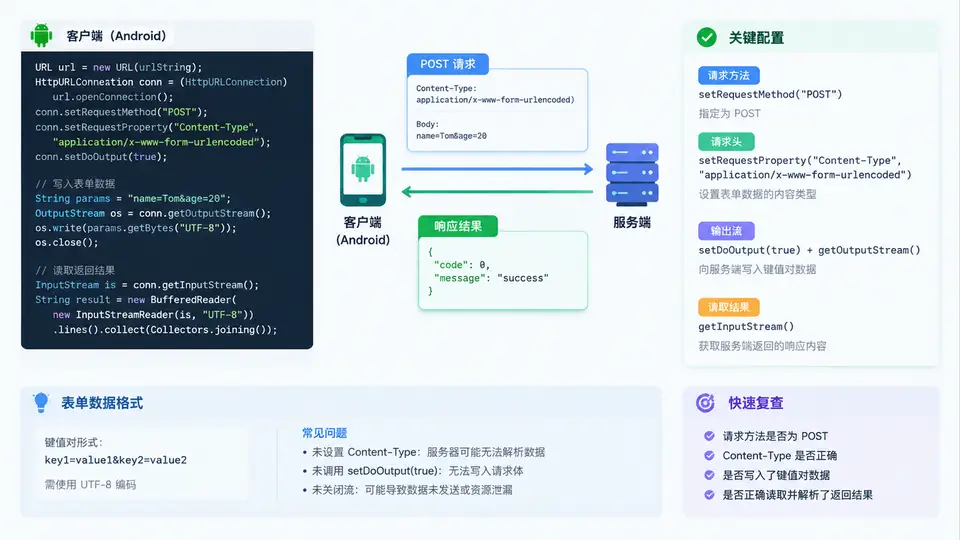
POST 表单提交的核心链路
GET 把参数拼在 URL 上,POST 则把键值对写进请求体。用 HttpURLConnection 发 POST 时,真正决定服务端能否正确解析表单的是三件事:请求方法设为 POST、Content-Type 声明为 application/x-www-form-urlencoded、以及通过输出流写入经过 URL 编码的键值对。三者缺一,服务端就可能收到空体或解析失败。
关键代码实现
下面是一个完整的 POST 表单提交方法。它把参数编码、请求头设置、输出流写入和响应读取串在一起,可直接放入 Android 项目的工具类中调用。
public static String postForm(String urlStr, Map<String, String> params) throws IOException {
    HttpURLConnection conn = null;
    try {
        URL url = new URL(urlStr);
        conn = (HttpURLConnection) url.openConnection();

        // 1. 请求方法与超时
        conn.setRequestMethod("POST");
        conn.setConnectTimeout(8000);
        conn.setReadTimeout(8000);

        // 2. 允许输出,并声明表单类型
        conn.setDoOutput(true);
        conn.setRequestProperty("Content-Type",
                "application/x-www-form-urlencoded;charset=UTF-8");

        // 3. 拼接并编码键值对
        StringBuilder body = new StringBuilder();
        for (Map.Entry<String, String> e : params.entrySet()) {
            if (body.length() > 0) body.append('&');
            body.append(URLEncoder.encode(e.getKey(), "UTF-8"))
                .append('=')
                .append(URLEncoder.encode(e.getValue(), "UTF-8"));
        }
        byte[] bytes = body.toString().getBytes(StandardCharsets.UTF_8);

        // 4. 写入请求体
        conn.setFixedLengthStreamingMode(bytes.length);
        try (OutputStream os = conn.getOutputStream()) {
            os.write(bytes);
            os.flush();
        }

        // 5. 读取响应
        int code = conn.getResponseCode();
        InputStream is = (code >= 200 && code < 300)
                ? conn.getInputStream() : conn.getErrorStream();

        StringBuilder resp = new StringBuilder();
        try (BufferedReader br = new BufferedReader(
                new InputStreamReader(is, StandardCharsets.UTF_8))) {
            String line;
            while ((line = br.readLine()) != null) {
                resp.append(line);
            }
        }
        return "code=" + code + ", body=" + resp;
    } finally {
        if (conn != null) conn.disconnect();
    }
}
为什么用 setFixedLengthStreamingMode:表单体长度已知时,提前告知长度可避免 HttpURLConnection 在内存中缓存整个请求体,也能让服务端更早确定读取边界。若长度未知,可改用
setChunkedStreamingMode(0)。
调用与结果判读
在子线程中调用,并把返回结果回传到主线程更新 UI:
new Thread(() -> {
    try {
        Map<String, String> form = new HashMap<>();
        form.put("name", "张三");
        form.put("age", "28");
        String result = postForm("https://httpbin.org/post", form);
        runOnUiThread(() -> tvResult.setText(result));
    } catch (IOException e) {
        runOnUiThread(() -> tvResult.setText("请求失败:" + e.getMessage()));
    }
}).start();| 观察点 | 正常表现 | 异常信号与排查方向 |
|---|---|---|
| 响应码 | 200 / 201 | 400 检查参数编码;415 检查 Content-Type;500 查服务端日志 |
| 响应体 | 包含提交的 name、age 字段 | 字段为空 → 输出流未写入或未 flush |
| 中文参数 | 服务端收到“张三” | 乱码 → 编码未用 UTF-8 或 Content-Type 缺 charset |
| 异常 | 无 | NetworkOnMainThreadException → 未放子线程;Permission denied → 缺 INTERNET 权限 |
常见坑:忘记
setDoOutput(true) 时,getOutputStream() 会抛异常或请求体为空;只设置 Content-Type 却不写输出流,服务端会收到空表单。两者必须同时满足。