4. 配置分层管理
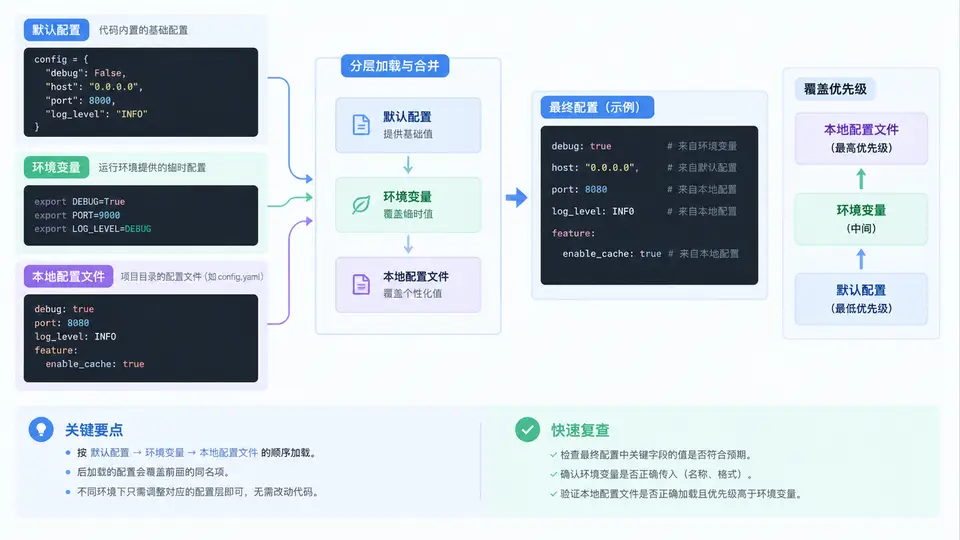
分层配置的加载顺序与覆盖规则
配置分层管理的核心是:越靠近运行现场的配置,优先级越高。本例采用四层结构,从低到高依次为:内置默认值 → 配置文件默认段 → 环境变量 → 本地私有配置文件。加载时逐层合并,高优先级层覆盖低优先级层的同名键。
实现分层加载器
下面实现一个 ConfigLoader 类,按上述四层顺序加载并合并配置。关键设计:每层返回一个字典,用 dict.update() 逐层覆盖;环境变量层通过前缀 APP_ 识别,并将 __ 转换为嵌套分隔符。
# config_loader.py
import os
import json
from pathlib import Path

DEFAULTS = {
    "host": "127.0.0.1",
    "port": 8000,
    "debug": False,
    "db_url": "sqlite:///app.db",
    "log_level": "INFO",
}

ENV_PREFIX = "APP_"

def load_file(path: str) -> dict:
    """加载 JSON 配置文件,文件不存在时返回空字典。"""
    p = Path(path)
    if not p.exists():
        return {}
    with open(p, encoding="utf-8") as f:
        return json.load(f)

def load_env(prefix: str = ENV_PREFIX) -> dict:
    """从环境变量提取配置,APP_PORT -> port, APP_DB__URL -> db.url"""
    result = {}
    for key, value in os.environ.items():
        if not key.startswith(prefix):
            continue
        # 去掉前缀,转小写,__ 转为嵌套分隔
        raw = key[len(prefix):].lower()
        parts = raw.split("__")
        # 尝试类型转换
        result[raw] = _coerce(value)
    return result

def _coerce(value: str):
    """将字符串转为 bool / int / float,失败则保留字符串。"""
    low = value.lower()
    if low in ("true", "false"):
        return low == "true"
    try:
        return int(value)
    except ValueError:
        pass
    try:
        return float(value)
    except ValueError:
        pass
    return value

def deep_merge(base: dict, override: dict) -> dict:
    """递归合并,override 覆盖 base 的同名键。"""
    merged = dict(base)
    for k, v in override.items():
        if k in merged and isinstance(merged[k], dict) and isinstance(v, dict):
            merged[k] = deep_merge(merged[k], v)
        else:
            merged[k] = v
    return merged

class ConfigLoader:
    def __init__(self, config_path: str = "config.json",
                 local_path: str = "config.local.json"):
        self.config_path = config_path
        self.local_path = local_path

    def load(self) -> dict:
        layers = [
            ("defaults", DEFAULTS),
            ("config_file", load_file(self.config_path)),
            ("env_vars", load_env()),
            ("local_file", load_file(self.local_path)),
        ]
        result = {}
        for name, layer in layers:
            result = deep_merge(result, layer)
        return result
验证覆盖优先级
创建两个配置文件模拟不同环境,然后通过环境变量注入覆盖值,观察最终结果是否符合预期。
# config.json —— 公共基准配置
{
  "port": 8080,
  "log_level": "INFO",
  "db_url": "postgresql://localhost/prod"
}
# config.local.json —— 开发者本机覆盖
{
  "port": 3000,
  "debug": true,
  "db_url": "sqlite:///dev.db"
}
# verify.py —— 验证脚本
import os
from config_loader import ConfigLoader

# 场景 A:无环境变量,仅默认 + 配置文件 + 本地文件
cfg_a = ConfigLoader().load()
print("场景A port:", cfg_a["port"])        # 期望 3000(本地文件覆盖)
print("场景A debug:", cfg_a["debug"])      # 期望 True(本地文件)
print("场景A log_level:", cfg_a["log_level"])  # 期望 INFO(仅配置文件有)

# 场景 B:注入环境变量 APP_PORT=9090
os.environ["APP_PORT"] = "9090"
cfg_b = ConfigLoader().load()
print("场景B port:", cfg_b["port"])        # 期望 9090(环境变量覆盖本地文件)
print("场景B debug:", cfg_b["debug"])      # 期望 True(本地文件仍生效)

# 场景 C:注入 APP_DEBUG=false 覆盖本地文件的 true
os.environ["APP_DEBUG"] = "false"
cfg_c = ConfigLoader().load()
print("场景C debug:", cfg_c["debug"])      # 期望 False(环境变量覆盖本地文件)
验证要点:场景 A 验证本地文件覆盖配置文件;场景 B 验证环境变量覆盖本地文件;场景 C 验证环境变量可以反向覆盖本地文件的布尔值。三个场景覆盖了四层中所有相邻层的覆盖关系。
各层覆盖关系速查
| 配置键 | ① 默认值 | ② config.json | ③ 环境变量 | ④ config.local.json | 最终生效 |
|---|---|---|---|---|---|
| port | 8000 | 8080 | — | 3000 | 3000 |
| debug | False | — | — | True | True |
| log_level | INFO | INFO | — | — | INFO |
| db_url | sqlite:///app.db | postgresql://localhost/prod | — | sqlite:///dev.db | sqlite:///dev.db |
| port(场景B) | 8000 | 8080 | 9090 | 3000 | 9090 |
| debug(场景C) | False | — | false | True | False |
常见陷阱:环境变量中的
APP_DEBUG=false 如果直接当字符串处理,在 Python 中 bool("false") 为 True,会导致覆盖失效。必须在 _coerce() 中显式处理布尔字符串。同理,APP_PORT=9090 需要转为 int,否则后续端口校验或拼接会出错。