4. Iceberg catalog 配置与快照查询
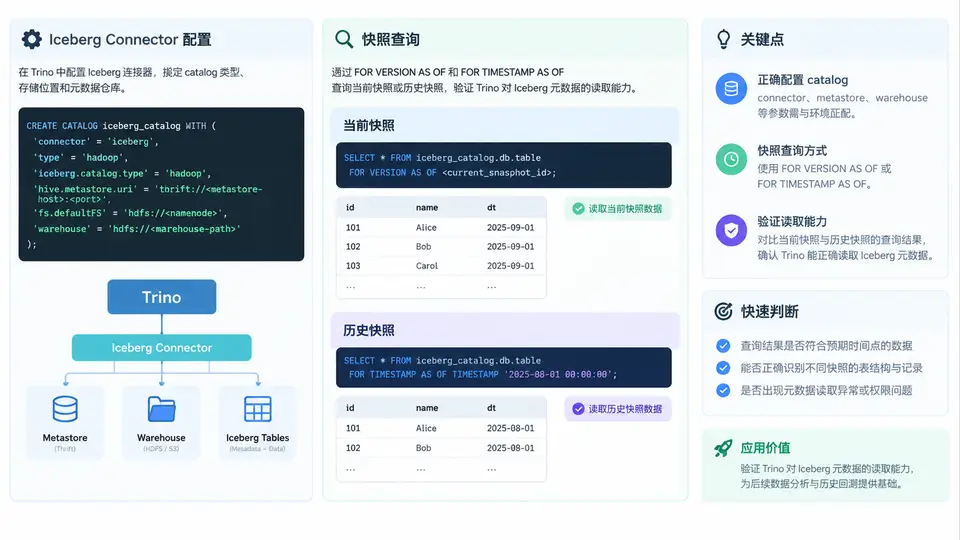
Iceberg connector 配置要点
Trino 通过 Iceberg connector 读取 Iceberg 表的元数据层(metadata.json、manifest、snapshot),因此 catalog 配置的核心是让 Trino 能同时访问 Hive Metastore(或 REST/Glue 等 catalog 服务)和 底层文件系统。以 Hive Metastore + HDFS 为例,在 etc/catalog/iceberg.properties 中写入:
connector.name=iceberg
iceberg.catalog.type=hive_metastore
hive.metastore.uri=thrift://metastore-host:9083
hive.config.resources=/etc/hadoop/conf/core-site.xml,/etc/hadoop/conf/hdfs-site.xml
iceberg.file-format=PARQUET
iceberg.unique-table-location=true
关键参数说明:
iceberg.catalog.type:决定元数据来源,可选hive_metastore、glue、rest、jdbc、nessie。选错会导致表能列出但快照信息读不到。hive.metastore.uri:Iceberg 表在 HMS 中注册为table_type=ICEBERG,Trino 通过它定位表的 metadata 路径。hive.config.resources:提供 HDFS 的fs.defaultFS与认证信息,否则读取 manifest 文件会报FileNotFoundException或权限错误。iceberg.unique-table-location:开启后每张表使用独立目录,避免多表共享路径导致快照混淆。
快照查询的两类入口
Iceberg 表的每次写入(INSERT、MERGE、DELETE)都会生成一个新快照,快照 ID 单调递增。Trino 提供两种方式访问历史快照:
- 元数据表:
"table_name$snapshots"列出所有快照的snapshot_id、committed_at、operation、summary;"table_name$history"展示快照血缘。 - 时间旅行:在查询中加
FOR VERSION AS OF <snapshot_id>或FOR TIMESTAMP AS OF <timestamp>,直接读取指定快照的数据。
下面这张图展示了从 catalog 配置到快照查询的完整数据流:Trino 先经 HMS 拿到表位置,再读 metadata.json 解析快照列表,最后按快照 ID 定位 manifest 与数据文件。
实操:查询当前快照与历史快照
假设已有一张 Iceberg 表 iceberg.analytics.orders,且经历过至少两次写入。先确认 catalog 可用:
SHOW CATALOGS;
SHOW SCHEMAS FROM iceberg;
SHOW TABLES FROM iceberg.analytics;
查看快照元数据表,拿到快照 ID 与操作类型:
SELECT snapshot_id, parent_id, committed_at, operation
FROM iceberg.analytics."orders$snapshots"
ORDER BY committed_at;
查询当前快照数据(默认行为):
SELECT order_id, customer_id, amount, order_date
FROM iceberg.analytics.orders
ORDER BY order_id
LIMIT 10;
用快照 ID 做时间旅行,读取历史版本:
SELECT order_id, customer_id, amount, order_date
FROM iceberg.analytics.orders
FOR VERSION AS OF 1234567890123456789
ORDER BY order_id
LIMIT 10;
也可以用时间戳(Trino 会选取该时刻之前最近的一个快照):
SELECT COUNT(*) AS cnt
FROM iceberg.analytics.orders
FOR TIMESTAMP AS OF TIMESTAMP '2024-06-01 10:00:00.000';
结果判读与常见问题
| 现象 | 可能原因 | 排查方向 |
|---|---|---|
Table does not exist | catalog type 与 HMS 中注册类型不匹配 | 检查 iceberg.catalog.type 是否为 hive_metastore |
$snapshots 返回空 | 表不是 Iceberg 表,或 metadata 路径不可达 | 确认 HMS 中 table_type=ICEBERG,检查 hive.config.resources |
时间旅行报 Snapshot not found | 快照 ID 已被 expire 清理 | 查 $snapshots 确认有效 ID 范围 |
| 读取 manifest 权限拒绝 | HDFS 认证未传递到 Trino worker | 确认 core-site.xml 与 Kerberos 配置已加载 |
验证要点:同一张表分别用当前快照、
FOR VERSION AS OF 和 FOR TIMESTAMP AS OF 查询,对比行数与关键字段值。若历史快照返回的行数少于当前快照,说明该快照之后发生了 DELETE 或 MERGE,属于正常现象。