2. 控制器路由与动作方法匹配
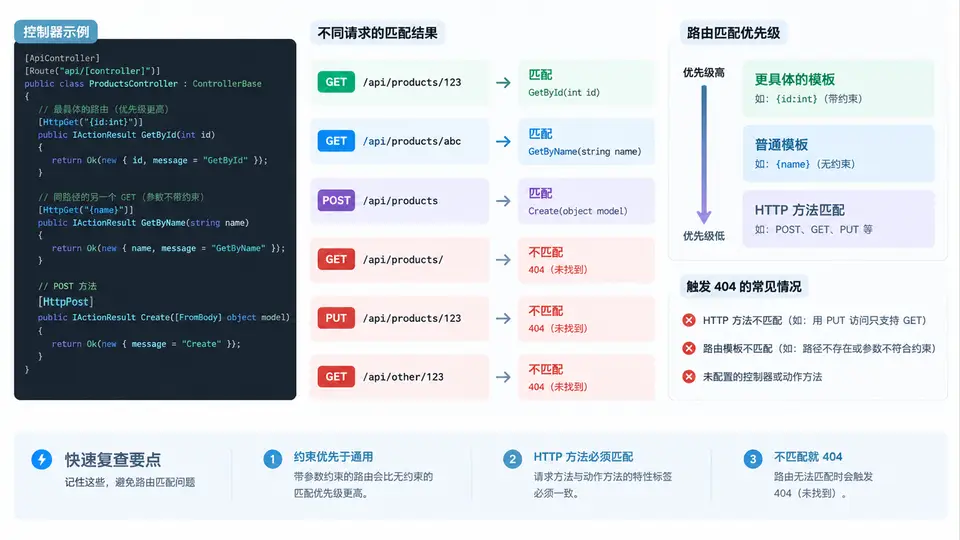
从最小 API 到控制器:路由匹配的完整链路
最小 API 用 app.MapGet("/path", handler) 把端点直接挂在管道上;控制器则把端点声明分散到 [Route]、[HttpGet]、[HttpPost] 等特性中,由 MVC 的 EndpointRouting + ActionSelector 在启动时构建候选动作集合,请求到达时再按优先级挑选唯一动作。理解这条链路,才能解释“为什么两个动作都能匹配时只有一个被执行”以及“什么情况下返回 404”。
创建控制器与多个动作方法
新建 Controllers/OrdersController.cs,用类级 [Route("api/[controller]")] 把控制器名 Orders 映射为路径段 orders([controller] 令牌自动去掉 Controller 后缀并转小写)。下面四个动作覆盖了“同一路径不同 HTTP 方法”“同一方法不同路径模板”“带约束的路由参数”三类典型匹配场景:
using Microsoft.AspNetCore.Mvc;

[ApiController]
[Route("api/[controller]")]
public class OrdersController : ControllerBase
{
    // GET /api/orders
    [HttpGet]
    public IActionResult GetAll() => Ok(new[] { "A-1001", "A-1002" });

    // GET /api/orders/42
    [HttpGet("{id:int}")]
    public IActionResult GetById(int id) => Ok(new { Id = id, Status = "Shipped" });

    // GET /api/orders/recent?days=7
    [HttpGet("recent")]
    public IActionResult GetRecent([FromQuery] int days = 3)
        => Ok(new { Days = days, Count = 2 });

    // POST /api/orders
    [HttpPost]
    public IActionResult Create([FromBody] string orderNo)
        => Created($"/api/orders/{orderNo}", new { OrderNo = orderNo });
}
注意 [ApiController] 会启用特性路由要求、自动 400 响应和参数来源推断;本例中 days 显式标注 [FromQuery],orderNo 显式标注 [FromBody],避免依赖推断规则带来的歧义。
路由匹配优先级:谁先被选中
ASP.NET Core 的路由匹配分两步:先由路由模板匹配出候选端点集合,再由 ActionSelector 按“字面量 > 约束参数 > 无约束参数”的顺序打分。因此 GET /api/orders/recent 会命中 GetRecent,而不是被 {id:int} 抢走——因为 recent 是字面量段,优先级高于参数段;而 GET /api/orders/42 中 42 满足 int 约束,命中 GetById;GET /api/orders/abc 不满足 int 约束,{id:int} 端点被排除,最终无候选端点,返回 404。
用 curl 验证四种匹配结果
启动应用后,用以下命令逐一验证。每条命令后标注了预期状态码与关键响应内容,便于对照 SVG 中的分支:
# 1) 字面量优先:命中 GetRecent,days 默认 3
curl -i http://localhost:5000/api/orders/recent
# 预期:200 OK,{"days":3,"count":2}

# 2) 约束参数:42 满足 int,命中 GetById
curl -i http://localhost:5000/api/orders/42
# 预期:200 OK,{"id":42,"status":"Shipped"}

# 3) 约束不满足:abc 不是 int,无候选端点
curl -i http://localhost:5000/api/orders/abc
# 预期:404 Not Found

# 4) 方法不匹配:路径存在但无 GET 动作
curl -i -X DELETE http://localhost:5000/api/orders/42
# 预期:405 Method Not Allowed

# 5) POST 创建:命中 Create,返回 201 与 Location
curl -i -X POST http://localhost:5000/api/orders \
  -H "Content-Type: application/json" \
  -d '"A-1003"'
# 预期:201 Created,Location: /api/orders/A-1003{id:int} 不匹配时端点直接被排除,不会进入 GetById 的参数绑定阶段。这与“参数类型转换失败返回 400”是两种不同的失败路径。404 与 405 的触发条件对照
| 请求 | 路径模板匹配 | HTTP 方法匹配 | 约束匹配 | 结果 |
|---|---|---|---|---|
| GET /api/orders | api/orders | HttpGet | — | 200 GetAll |
| GET /api/orders/recent | api/orders/recent | HttpGet | — | 200 GetRecent |
| GET /api/orders/42 | api/orders/{id:int} | HttpGet | int 通过 | 200 GetById |
| GET /api/orders/abc | api/orders/{id:int} | HttpGet | int 失败 | 404 |
| DELETE /api/orders/42 | api/orders/{id:int} | 无 DELETE 动作 | — | 405 |
| POST /api/orders | api/orders | HttpPost | — | 201 Create |
常见匹配歧义与排查
- 两个动作同路径同方法:启动时
ActionSelector抛出AmbiguousMatchException,应用无法启动。解决方式是给其中一个加更具体的路由模板或约束。 - 字面量被参数段遮蔽:若把
GetRecent写成[HttpGet("{id}")],则/api/orders/recent会命中它而非GetById,因为无约束参数优先级低于字面量但高于约束参数——此时recent会被当作id传入,需在动作内自行判断。 - 404 排查顺序:先确认控制器是否被
[ApiController]标记且路由模板拼写正确,再确认 HTTP 方法特性是否匹配,最后检查路由约束是否排除了请求。
{id:int:min(1)} 中 min(1) 属于路由约束,id=0 会直接 404;若希望返回 400 并附带错误说明,应改用模型验证(见后续数据注解案例)。