4. 使用 _bulk 批量导入 JSON 数据并处理错误响应
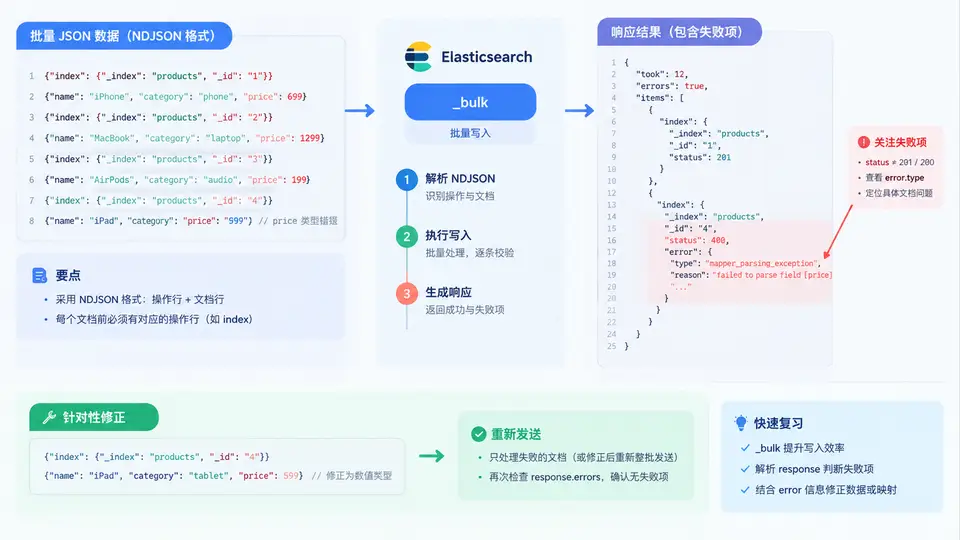
为什么批量写入必须看响应体
单条 PUT /index/_doc/1 写入失败时,HTTP 状态码通常直接给出 4xx/5xx。但 _bulk 是"混合结果"接口:只要请求体本身能被解析,服务端就返回 HTTP 200,而每条文档的成功或失败写在响应体的 items 数组里。因此批量导入的正确姿势是:先看 HTTP 状态码判断请求是否合法,再逐条扫描 items 判断文档是否落库。
常见误区:只判断
response.status == 200 就认为全部成功。实际上 200 响应里可能混有 mapper_parsing_exception、version_conflict_engine_exception、document_missing_exception 等失败项。_bulk 请求体结构与响应映射
NDJSON(Newline Delimited JSON)格式有两条硬性规则:每个 action 行和紧随其后的 source 行都必须以 \n 结尾,包括最后一行;action 行与 source 行必须成对出现(delete 动作除外,它不需要 source 行)。响应中的 items[i] 与请求中的第 i 个动作一一对应,这是定位失败文档的关键。
构造并发送 _bulk 请求
下面用 Python 的 requests 库演示完整流程:构造 NDJSON 请求体、发送请求、解析响应、提取失败项。假设索引 products 已按前例创建,Mapping 中 price 为 integer,name 为 text,stock 为 integer。
import json
import requests

ES = "http://localhost:9200"
INDEX = "products"

# 待导入文档:P002 的 price 故意写成字符串,P005 的 _id 与已有文档冲突
docs = [
    {"_id": "P001", "name": "无线耳机", "price": 299, "stock": 50},
    {"_id": "P002", "name": "蓝牙音箱", "price": "三百", "stock": 20},
    {"_id": "P003", "name": "机械键盘", "price": 459, "stock": 15},
    {"_id": "P005", "name": "显示器", "price": 1299, "stock": 8},
]

# 构造 NDJSON:action 行 + source 行,每行以 \n 结尾
lines = []
for d in docs:
    action = {"index": {"_index": INDEX, "_id": d["_id"]}}
    source = {k: v for k, v in d.items() if k != "_id"}
    lines.append(json.dumps(action, ensure_ascii=False))
    lines.append(json.dumps(source, ensure_ascii=False))
body = "\n".join(lines) + "\n"   # 最后一行必须有换行

resp = requests.post(
    f"{ES}/_bulk",
    data=body.encode("utf-8"),
    headers={"Content-Type": "application/x-ndjson"},
)
print("HTTP:", resp.status_code)   # 预期 200

result = resp.json()
print("took:", result["took"], "ms")
print("errors:", result["errors"])  # True 表示存在失败项

# 逐条检查
failed = []
for i, item in enumerate(result["items"]):
    action = list(item.keys())[0]          # index / create / update / delete
    info = item[action]
    status = info["status"]
    if status >= 300:
        err = info.get("error", {})
        failed.append({
            "pos": i,
            "id": info.get("_id"),
            "action": action,
            "status": status,
            "type": err.get("type"),
            "reason": err.get("reason"),
        })

print(f"成功 {len(docs) - len(failed)} 条,失败 {len(failed)} 条")
for f in failed:
    print(f)
预期输出(示例):
HTTP: 200
took: 12 ms
errors: True
成功 2 条,失败 2 条
{'pos': 1, 'id': 'P002', 'action': 'index', 'status': 400,
 'type': 'mapper_parsing_exception',
 'reason': 'failed to parse field [price] of type [integer]'}
{'pos': 3, 'id': 'P005', 'action': 'index', 'status': 409,
 'type': 'version_conflict_engine_exception',
 'reason': '[P005]: version conflict, required seqNo [1], primary term [1]'}
失败项修正与重发
拿到失败列表后,按 error.type 分类处理:
- mapper_parsing_exception:字段值与 Mapping 类型不匹配。修正数据本身(如把
"三百"改为300),或调整 Mapping 后重建索引。 - version_conflict_engine_exception:并发写入或重复提交。可加
retry_on_conflict参数,或降低并发、去重后重发。 - document_missing_exception:
delete或update的目标文档不存在。确认_id是否正确,或改用upsert。 - index_not_found_exception:目标索引不存在。先创建索引和 Mapping 再导入。
修正后只重发失败文档,避免全量重跑:
# 修正 P002 的 price 类型
fixed_docs = [
    {"_id": "P002", "name": "蓝牙音箱", "price": 300, "stock": 20},
]

lines = []
for d in fixed_docs:
    lines.append(json.dumps({"index": {"_index": INDEX, "_id": d["_id"]}}, ensure_ascii=False))
    lines.append(json.dumps({k: v for k, v in d.items() if k != "_id"}, ensure_ascii=False))
body = "\n".join(lines) + "\n"

resp = requests.post(f"{ES}/_bulk", data=body.encode("utf-8"),
                     headers={"Content-Type": "application/x-ndjson"})
result = resp.json()
print("errors:", result["errors"])   # 预期 False
批量导入时建议把
_bulk 的批次大小控制在 1000~5000 条或 5~15 MB 之间。过大会增加单次请求超时和内存压力,过小则网络往返开销占比过高。可通过 took 字段观察服务端处理耗时,逐步调整批次大小。验证导入结果
重发成功后,用 _count 或 _search 确认文档数量与内容:
# 确认索引中文档总数
r = requests.get(f"{ES}/{INDEX}/_count")
print(r.json())   # {"count": 4, "_shards": {...}}

# 确认 P002 的 price 已修正为数值
r = requests.get(f"{ES}/{INDEX}/_doc/P002")
print(r.json()["_source"])   # {'name': '蓝牙音箱', 'price': 300, 'stock': 20}
判断标准:
_bulk 响应中 errors 为 false,且 _count 返回的文档数与预期一致,说明本批次全部写入成功。